FunctionFox Overview
FunctionFox streamlines creative agency operations with its specialized management software. Designed specifically for creative teams, it simplifies online timesheet tracking and project management. Users can efficiently handle estimates and invoices, ensuring no detail is overlooked. The software's intuitive setup and user-friendly interface cater to the unique workflows of creative professionals. FunctionFox is a trusted choice globally, offering a comprehensive solution that aligns with industry-specific needs. This tool enhances productivity by providing a centralized platform for managing all aspects of agency work, from time tracking to financial management.
Use Cases
Customers recommend Workflow Management, Helpdesk Management, Advertisement, as the business use cases that they have been most satisfied with while using FunctionFox.
Business Priorities
Improve Efficiency and Improve Internal Communications are the most popular business priorities that customers and associates have achieved using FunctionFox.
FunctionFox Use-Cases and Business Priorities: Customer Satisfaction Data
FunctionFox works with different mediums / channels such as User Generated Content. Blogs. Phone Calls etc.
FunctionFox's features include Recording, Personalization, Dashboard, etc. and FunctionFox support capabilities include 24/7 Support, Email Support, Phone Support, etc. also FunctionFox analytics capabilities include Analytics, and Custom Reports.
Reviews
"...This program makes estimating new projects, tracking time and expenses, and managing workflow a cinch...." Peer review by Peigi McGillivray, Marketing and Advertising
Peer review evidence (same sources as the product rating summary)
"..."As an in house design team for a large organization, we are responsible for a high volume of projects with both short and long turnaround times and we ve been able to manage the flow of work quite seamlessly with FunctionFox...." Project Management for In-House Teams
"...If we encounter a problem anywhere while using this system (for example changes in billing rates) we contact customer support and help is offered right away. ...." Peer review by Kathryn L., Office Manager, Mechanical or Industrial Engineering
"...FunctionFox Case Study: Blaine Turner Advertising...." FunctionFox
FunctionFox, Prism PPM (formerly WorkOtter), TeamGantt, MeisterTask, Airtable, etc., all belong to a category of solutions that help Project Management. Each of them excels in different abilities. Therefore, determining the best platform for your business will depend on your specific needs and requirements.
FunctionFox simplifies timesheet tracking and project management for creative teams. It is intuitive, easy to set up, and trusted globally.
Popular Business Setting
for FunctionFox
Top Industries
- Marketing and Advertising
- Design
- Computer Software
Popular in
- Small Business
- Mid Market
- Enterprise
FunctionFox is popular in Marketing And Advertising, Design, and Computer Software and is widely used by Small Business, Mid Market, and Enterprise.
FunctionFox Customer wins, Customer success stories, Case studies
What solutions does FunctionFox provide for Workflow Management?
Why is FunctionFox the best choice for Helpdesk Management?
Why is FunctionFox the best choice for Advertisement?
How can FunctionFox optimize your Rating And Review Management Workflow?
How does FunctionFox facilitate Proposal & Quote Management?
FunctionFox: Lite Platform Overview

Frequently Asked Questions (FAQ)
What buyers ask before choosing FunctionFox
Integrations What CRM integrations are available for FunctionFox?
FunctionFox offers several CRM integrations to enhance its functionality for creative professionals. Notable integrations include Salesforce, which allows users to manage customer relationships and sales processes seamlessly, and Marketo, which supports marketing automation efforts. Additionally, FunctionFox integrates with Pardot, providing tools for B2B marketing automation, and SalesLoft, which helps streamline sales engagement. These integrations enable users to synchronize data across platforms, improve workflow efficiency, and gain insights into customer interactions. By leveraging these CRM integrations, businesses can enhance their project management capabilities while maintaining a comprehensive view of client relationships, ultimately driving productivity and growth.
Integrations How does FunctionFox connect to Salesforce and HubSpot?
FunctionFox connects to Salesforce and HubSpot through specific integrations that streamline project management and enhance customer relationship management. By integrating with Salesforce, FunctionFox allows users to synchronize project data, track client interactions, and manage sales pipelines directly within the FunctionFox platform, ensuring that all team members have access to up-to-date information. Similarly, the HubSpot integration enables users to link marketing efforts with project management, allowing for better tracking of leads and campaign performance. These integrations facilitate a seamless flow of information between FunctionFox and these CRM platforms, improving overall efficiency and collaboration within creative agencies. To set up these integrations, users can follow the detailed instructions provided in the FunctionFox Help Center.
Integrations What are the setup steps for integrating FunctionFox with Marketo?
To integrate FunctionFox with Marketo, start by gathering your data and ensuring you have administrative access to both platforms. First, log into your FunctionFox account and navigate to the integration settings. Here, you will find the option to connect with Marketo. You will need to enter your Marketo API credentials, which include the client ID and client secret, available in your Marketo account under the Admin section. Once the connection is established, configure the data synchronization settings to determine which data points you want to share between the two systems, such as project statuses or client information. Finally, test the integration to ensure that data flows correctly between FunctionFox and Marketo, allowing for streamlined marketing efforts and improved project management.
Integrations Can FunctionFox sync data with Pardot, and what is the sync behavior?
Yes, FunctionFox can sync data with Pardot, allowing for seamless integration between project management and marketing automation. The sync behavior typically involves the transfer of key data points such as project timelines, budgets, and resource allocations from FunctionFox to Pardot, enabling marketing teams to align their campaigns with project statuses and resource availability. This integration helps ensure that marketing efforts are informed by real-time project data, enhancing collaboration between creative and marketing teams. Additionally, users can manage their data effectively, as FunctionFox prioritizes data security and ownership, allowing you to download and control your information as needed. This integration ultimately streamlines workflows and improves efficiency across departments.
Integrations What limitations should I be aware of when integrating FunctionFox with SalesLoft?
When integrating FunctionFox with SalesLoft, it's important to be aware of a few limitations that may affect your workflow. While FunctionFox excels in project management and time tracking, its integration with SalesLoft may not support all features available in either platform, potentially limiting data synchronization or real-time updates. Users might experience challenges in aligning project timelines with SalesLoft's sales engagement metrics, which could lead to discrepancies in reporting. Additionally, the integration may require manual adjustments or additional configuration to ensure seamless communication between the two systems. It's advisable to consult FunctionFox's customer support for guidance on best practices and to understand any specific constraints related to your unique setup.
Integrations How does data flow between FunctionFox and Dynamics 365?
Data flows between FunctionFox and Dynamics 365 through a seamless integration that allows for the synchronization of project management and financial data. This integration enables users to consolidate their project timelines, budgets, and team availability from FunctionFox into Dynamics 365, ensuring that all relevant information is accessible in one platform. By connecting these two systems, agencies can enhance their reporting capabilities, improve profitability forecasts, and maintain accurate financial records. Additionally, this integration supports real-time updates, allowing teams to make informed decisions based on the latest data. Overall, the FunctionFox and Dynamics 365 integration streamlines workflows and enhances operational efficiency for creative agencies.
Features What does the document workflow automation feature in FunctionFox do?
The document workflow automation feature in FunctionFox streamlines the process of managing documents within a business, enhancing efficiency and collaboration. This feature allows users to automate repetitive tasks associated with document handling, such as approvals, routing, and notifications, thereby reducing manual errors and saving time. By integrating document workflows into project management, FunctionFox enables teams to track document progress, maintain version control, and ensure that all stakeholders have access to the latest information. This not only boosts productivity but also improves accountability, as team members can easily monitor the status of documents and tasks. Overall, the document workflow automation feature is designed to simplify complex processes, allowing businesses to focus on their core activities while ensuring that documentation is handled seamlessly.
Features How do I configure the time tracking feature in FunctionFox?
To configure the time tracking feature in FunctionFox, start by logging into your account and navigating to the time tracking section. Here, you can choose between two methods for tracking time: the real-time stopwatch or manual entry. If you prefer the stopwatch, simply click to start and stop as you work on tasks. For manual entry, select the specific project and task, then input the hours worked. To streamline your process, consider creating task templates for repetitive activities, which allows you to quickly log time for regular meetings or tasks by reusing previous entries. Additionally, ensure that your team members have the appropriate access and permissions set up to facilitate collaboration. With these steps, you can effectively manage and monitor your agency's time tracking needs.
Features What functionalities does the client management system in FunctionFox offer?
FunctionFox's client management system offers a comprehensive suite of functionalities designed to streamline the management of client relationships and project workflows. Key features include the ability to track client communications, manage project timelines, and oversee budgets, ensuring that creative teams can stay organized and efficient. The system allows users to assign tasks, set deadlines, and monitor progress across multiple projects, which is crucial for agencies handling various clients simultaneously. Additionally, FunctionFox provides tools for invoicing and estimates, enabling seamless financial management alongside project oversight. This integrated approach not only enhances productivity but also fosters better client relationships by ensuring transparency and timely communication throughout the project lifecycle.
Features How can I use the project progress tracking feature in FunctionFox?
To use the project progress tracking feature in FunctionFox, start by logging into your account and navigating to the centralized dashboard, where you can view all active projects. Each project will display timelines, milestones, and current status, allowing you to monitor progress at a glance. You can assign tasks with specific deadlines to team members, ensuring everyone knows their responsibilities. Additionally, utilize the multi-project calendars to see overlapping deadlines and manage workloads effectively. Regularly update project statuses and review the budget and profitability reports to gain insights into project performance. This feature not only helps in keeping projects on track but also enhances team productivity by providing a clear overview of progress and deadlines.
Features What is the purpose of the budget management system in FunctionFox?
The budget management system in FunctionFox is designed specifically for creative agencies to streamline financial oversight and enhance project management. Its primary purpose is to provide real-time tracking of budgets, allowing users to see updates instantly as timesheets and expenses are logged. This functionality helps prevent budget overruns by offering clear visibility into how time and money are being utilized throughout a project. By setting budgets based on total costs or hours, agencies can monitor their financials live, ensuring fiscal clarity and avoiding unexpected budgetary surprises. Ultimately, FunctionFox's budget management system empowers creative teams to manage their resources more effectively, leading to improved productivity and increased profitability.
Features How do I set up automated workflows in FunctionFox?
To set up automated workflows in FunctionFox, start by logging into your FunctionFox account and navigating to the "Workflow" section. Here, you can create a new workflow by selecting "Add Workflow" and defining the specific tasks and processes you want to automate. Customize the workflow by assigning team members, setting deadlines, and establishing triggers for notifications or task transitions. Utilize the built-in templates for common workflows to streamline the setup process. Once your workflow is configured, test it to ensure it operates as intended, making adjustments as necessary. For further assistance, consult the Knowledge Base or reach out to the Customer Success Team for personalized support. This automation will enhance efficiency, reduce manual errors, and improve overall project management within your team.
ROI & pricing What measurable business value can FunctionFox provide for my agency?
FunctionFox provides measurable business value for your agency by enhancing productivity, efficiency, and profitability through its tailored reporting and project management features. With real-time financial, capacity, and utilization reports, FunctionFox enables you to track client hours, staff utilization, and project profitability, ensuring that projects stay on track and within budget. The software's user-friendly interface allows for effortless time tracking and quick access to key performance indicators (KPIs), giving you a comprehensive view of your agency's operations. Additionally, FunctionFox's exceptional customer support and professional services, including consulting and training, empower your team to refine workflows and make informed decisions, ultimately driving clarity and confident decision-making for your agency's growth.
ROI & pricing How does FunctionFox impact ROI and cost savings for businesses?
FunctionFox significantly impacts ROI and cost savings for businesses by streamlining project management and enhancing productivity. By providing an intuitive user interface and easy-to-use time tracking features, FunctionFox allows teams to efficiently manage their workloads, reducing the time spent on administrative tasks. This efficiency translates into faster project completion and improved billing accuracy, which can lead to increased revenue. Additionally, the platform's robust reporting capabilities empower businesses to analyze key performance indicators (KPIs) and make data-driven decisions, further optimizing resource allocation and minimizing waste. Users have reported that the minimal investment required for FunctionFox yields substantial returns, as it helps agencies save time and reduce operational costs, ultimately enhancing profitability and supporting sustainable growth.
ROI & pricing What are the different pricing plans available for FunctionFox?
FunctionFox offers several pricing plans tailored to meet the diverse needs of creative professionals and agencies. The main plans include Classic, Premier, and In-House options, each designed to provide varying levels of features and capabilities. The Classic plan is ideal for smaller teams, while the Premier plan includes advanced features such as custom job intake forms and an advanced report builder. The In-House plan is tailored for organizations that require extensive project management capabilities. All plans come with unlimited clients and active projects, along with features like time tracking, budgeting, and reporting tools. To find the best fit for your agency, you can compare the features of each plan and book a demo to see FunctionFox in action.
ROI & pricing What is the total cost of ownership when using FunctionFox?
The total cost of ownership (TCO) when using FunctionFox includes several components that contribute to its overall value for businesses, particularly in the creative industry. FunctionFox offers a pricing structure that is designed to be accessible for small businesses, requiring a minimal upfront investment while providing essential features for project management, time tracking, and billing. Users have reported that the ease of setup—often completed in just an afternoon—along with the strong customer support, enhances the software's value, reducing the need for extensive training or additional resources. Additionally, the efficiency gains from using FunctionFox can lead to significant time and cost savings in project management and invoicing, ultimately making it a cost-effective solution for agencies looking to streamline their operations.
ROI & pricing How quickly can I expect to see value from implementing FunctionFox?
When implementing FunctionFox, many users report experiencing significant value within a remarkably short timeframe. For instance, some businesses have noted that the initial setup and customization can take as little as 48 hours, allowing teams to start utilizing its features almost immediately. Users have highlighted that the intuitive interface and user-friendly design facilitate quick adoption, enabling staff to efficiently track time, manage projects, and access key performance metrics without a steep learning curve. Additionally, FunctionFox's responsive customer support ensures that any questions or issues are addressed promptly, further enhancing the onboarding experience. As a result, organizations often see improvements in productivity and efficiency shortly after implementation, making FunctionFox a valuable asset for creative professionals looking to streamline their workflows.
ROI & pricing What are the implementation costs associated with FunctionFox?
The implementation costs associated with FunctionFox are designed to be minimal, making it an attractive option for small businesses and creative agencies. Users have reported that the pricing structure is straightforward and affordable, allowing for a seamless purchasing decision without significant upfront investment. Many clients, like Brown, found that FunctionFox provided the necessary features at a low cost, which facilitated their transition from manual systems like Excel to a more efficient web-based solution. Additionally, the setup process is quick, often taking just an afternoon, with little to no learning curve, further reducing the overall implementation costs. This efficiency not only saves time but also enhances productivity, making FunctionFox a valuable asset for managing projects and billing effectively.
Capabilities Can FunctionFox help manage multiple projects simultaneously?
Yes, FunctionFox is specifically designed to help manage multiple projects simultaneously, making it an ideal choice for creative and marketing teams. Its user-friendly interface allows users to track progress across all active projects in one centralized location, ensuring that no detail is overlooked. You can easily assign tasks with clear deadlines, manage team resources, and generate comprehensive budget and cost reports, all of which contribute to improved workflow and productivity. By utilizing FunctionFox, teams can streamline their project management processes, keeping projects on track and within budget, which is crucial when juggling multiple clients and overlapping campaigns. This capability not only enhances efficiency but also helps teams focus on delivering high-quality work without the chaos of disorganization.
Capabilities Does FunctionFox support real-time time tracking for teams?
Yes, FunctionFox supports real-time time tracking for teams, making it an ideal solution for creative agencies. The software offers a real-time stopwatch feature that allows team members to track their time as they work on projects, providing immediate visibility into project progress and team productivity. This functionality is particularly beneficial for designers and writers who need to monitor their time accurately without interrupting their workflow. Additionally, FunctionFox enables users to create task templates for repetitive tasks, streamlining the time tracking process further. With its user-friendly interface and robust reporting capabilities, FunctionFox ensures that teams can easily manage their time and budgets, ultimately enhancing project efficiency and preventing budget overruns.
Capabilities Can FunctionFox provide reporting capabilities for project performance?
Yes, FunctionFox offers robust reporting capabilities specifically designed for project performance within marketing agencies. With access to over 50 pre-built report types, users can track essential metrics such as client hours, staff utilization, project profitability, and team capacity. The software allows for customization, enabling agencies to tailor reports to their unique workflows and needs, whether they bill clients on a flat fee or hourly basis. FunctionFox’s reporting tools provide a comprehensive view of project performance, allowing teams to analyze data in real-time and make informed, data-driven decisions. This flexibility ensures that agencies can monitor their projects closely, ensuring they stay on track and within budget, ultimately enhancing productivity and profitability.
Capabilities Does FunctionFox offer features for budget management and tracking?
Yes, FunctionFox offers robust features specifically designed for budget management and tracking, making it an ideal choice for creative agencies. The platform allows users to monitor budgets in real-time as expenses and timesheets are logged, ensuring fiscal clarity and preventing budget overruns. With its agency budgeting software, FunctionFox provides instant updates on project financials, which helps agencies maintain profitability and avoid unexpected costs. Additionally, the software includes advanced reporting tools that allow users to customize reports based on their specific billing methods, whether flat fee or hourly. This level of financial oversight is crucial for agencies looking to enhance their project visibility and streamline their budgeting processes.
Capabilities Can FunctionFox scale to accommodate the needs of large enterprises?
Yes, FunctionFox can scale to accommodate the needs of large enterprises effectively. Designed specifically for creative professionals, FunctionFox has been successfully utilized by agencies of various sizes, including those with up to 25 employees, as noted by users like Stüssy Tschudin from Forge. The software provides essential features such as project management, time tracking, and real-time metrics, which are crucial for larger teams managing multiple projects simultaneously. Additionally, FunctionFox offers unparalleled customer support, with an average response time of less than one hour, ensuring that enterprises receive timely assistance as their needs evolve. This combination of robust functionality and responsive support makes FunctionFox a viable solution for large organizations looking to enhance productivity and efficiency in their creative workflows.
Capabilities Does FunctionFox ensure compliance with data security standards?
Yes, FunctionFox is committed to ensuring compliance with data security standards to protect your information. The company employs robust security measures, including secure off-site servers and regular password changes, to safeguard customer data. FunctionFox's infrastructure is designed to be scalable and reliable, utilizing advanced servers and backup systems to maintain 24/7 availability. Access to customer information is strictly limited to authorized customer service representatives and technicians, and only with customer permission. Additionally, FunctionFox does not share, track, or analyze proprietary data unless explicitly requested by the customer, ensuring that your data remains confidential and secure. For more detailed information about their security procedures, you can refer to their dedicated Security page.
Use cases How can SDRs use FunctionFox to manage their project timelines and client communications more effectively?
Sales Development Representatives (SDRs) can leverage FunctionFox to enhance their project timelines and client communications by utilizing its centralized dashboard, which consolidates all active projects, timelines, and client interactions in one place. By assigning tasks with clear deadlines, SDRs can ensure that follow-ups and client requests are managed efficiently, reducing the risk of missed communications. The platform's real-time reporting features allow SDRs to track project progress and client engagement, enabling them to adjust their strategies proactively. Additionally, the time tracking capabilities help SDRs log their activities accurately, ensuring that they can allocate their time effectively across multiple clients and projects. Overall, FunctionFox streamlines the workflow for SDRs, allowing them to focus on building relationships and driving sales while keeping projects on track.
Use cases What are the best practices for marketers to streamline their workflow using FunctionFox in a high-volume request environment?
To streamline workflow using FunctionFox in a high-volume request environment, marketers should first leverage the software's project management features to categorize and prioritize incoming requests effectively. Implementing a centralized system for tracking project deadlines, team capacity, and budgets allows for better visibility and accountability. Regularly utilizing the reporting tools can help identify bottlenecks and optimize resource allocation. Additionally, establishing clear communication channels within FunctionFox can facilitate collaboration among team members, ensuring everyone is aligned on project goals. Training sessions and ongoing support from FunctionFox can further enhance user adoption and efficiency, allowing teams to focus on creative tasks rather than administrative burdens. By following these best practices, marketers can significantly improve productivity and manage high volumes of requests with ease.
Use cases In what situations should RevOps teams implement FunctionFox to improve project monitoring and reporting?
RevOps teams should consider implementing FunctionFox when they need a robust solution for project monitoring and reporting, particularly in creative environments where tracking client hours, staff utilization, and project profitability is crucial. FunctionFox's centralized dashboard allows teams to consolidate all relevant data, providing real-time insights into budgets, timelines, and team capacity. This is especially beneficial for agencies managing multiple projects simultaneously, as it enables them to keep projects on track and within budget. Additionally, if a team is transitioning from manual tracking methods, such as Excel, to a more streamlined, automated system, FunctionFox can significantly enhance efficiency and reduce administrative burdens. The software's strong customer support and ease of setup further make it an ideal choice for RevOps teams looking to improve their operational effectiveness.
Use cases How can sales leaders leverage FunctionFox to track team capacity and workload distribution across multiple projects?
Sales leaders can leverage FunctionFox to effectively track team capacity and workload distribution across multiple projects by utilizing its Availability tool, which provides a real-time view of each team member's workload. This feature allows leaders to compare the hours available for each team member against their current assignments, enabling them to identify who is overburdened or has the capacity to take on additional work. Additionally, FunctionFox’s centralized dashboard consolidates project timelines, milestones, and team availability, ensuring that sales leaders have instant access to accurate budget and profitability reports. By employing Gantt charts and timeline views, they can visualize workload shifts and make informed decisions about resource allocation, ultimately improving productivity and ensuring that projects remain on track and within budget.
Use cases What specific challenges can creative agencies solve by adopting FunctionFox for time tracking and project management?
Creative agencies can address several challenges by adopting FunctionFox for time tracking and project management. One major issue is the difficulty in monitoring project progress and ensuring that budgets are not exceeded; FunctionFox provides real-time reporting and interactive charts that enhance visibility into project status. Additionally, the platform offers two time tracking methods—real-time stopwatch and manual entry—allowing teams to choose what best fits their workflow, which helps prevent time loss and inaccuracies. FunctionFox also simplifies project management by consolidating tasks, deadlines, and client information in one intuitive interface, making it easier to juggle multiple projects simultaneously. This streamlined approach not only boosts productivity but also enhances accountability, ensuring that all hours worked are accurately recorded and billed, ultimately leading to improved financial management for creative agencies.
Use cases How did Stauber Design Studio successfully implement FunctionFox to transition from manual tracking to a more efficient system?
Stauber Design Studio successfully implemented FunctionFox by recognizing the need for a simple, web-based system to track hours and expenses for their projects, moving away from their previous reliance on Excel and manual notes. The transition was remarkably efficient, taking just an afternoon to set up, which included assigning passwords and configuring the system. The ease of use was a significant factor, as there was almost no learning curve, allowing the team to start using the software immediately. FunctionFox's strong customer support further facilitated the process, ensuring that any questions or issues were promptly addressed. This streamlined approach not only saved time on billing and project tracking but also enhanced overall productivity, allowing Stauber to focus more on their creative work.
Alternatives FunctionFox vs Toggl: Which time tracking tool is better for creative teams?
When comparing FunctionFox and Toggl for creative teams, both tools offer unique advantages tailored to different needs. FunctionFox is specifically designed for the creative industry, providing features like customizable job intake forms, advanced reporting, and the ability to track time against retainers, making it ideal for agencies that require detailed project visibility and budget management. In contrast, Toggl is known for its simplicity and flexibility, offering a user-friendly interface and robust reporting capabilities that appeal to teams looking for straightforward time tracking without the complexity. Ultimately, the choice between FunctionFox and Toggl depends on whether your creative team prioritizes industry-specific features and project management (FunctionFox) or a more general, easy-to-use time tracking solution (Toggl).
Alternatives What are the key differences between FunctionFox and Harvest?
FunctionFox and Harvest are both popular time tracking and project management tools, but they cater to slightly different needs. FunctionFox is tailored specifically for creative professionals, offering features like project tracking, time logging, and client management that are designed to enhance productivity in creative agencies. It emphasizes user-friendly interfaces and robust reporting capabilities. In contrast, Harvest provides a broader range of functionalities, including expense tracking and invoicing, making it suitable for various industries beyond just creative fields. While both platforms offer time tracking and reporting, FunctionFox excels in creative project management, whereas Harvest is more versatile for general business applications. Ultimately, the choice between the two depends on whether your focus is on creative workflows or a more general business approach.
Alternatives Is FunctionFox a better choice than Teamwork for project management?
FunctionFox and Teamwork both offer robust project management solutions, but they cater to different needs and preferences. FunctionFox is specifically designed for creative and marketing teams, providing features like time tracking, resource management, and budget reporting, which are essential for agencies juggling multiple clients and projects. Its user-friendly interface allows for easy task assignment and progress tracking. On the other hand, Teamwork offers a broader range of project management tools, including advanced collaboration features and integrations with various platforms, making it suitable for diverse industries. Ultimately, the choice between FunctionFox and Teamwork depends on your team's specific requirements; if you prioritize agency-focused features, FunctionFox may be the better option, while Teamwork might be preferable for teams needing extensive collaboration tools.
Alternatives What makes Workamajig a strong alternative to FunctionFox?
Workamajig is a strong alternative to FunctionFox, particularly for creative agencies seeking a comprehensive project management solution. It offers robust features such as integrated project management, resource scheduling, and financial management, which can streamline workflows and enhance collaboration among teams. Unlike FunctionFox, which focuses primarily on time tracking and job costing, Workamajig provides a more holistic approach by combining project management with budgeting and invoicing capabilities. This can be particularly beneficial for larger teams or agencies that require detailed oversight of project timelines and financials. Additionally, Workamajig's user-friendly interface and customizable dashboards allow for tailored reporting and insights, making it easier for teams to track progress and performance metrics. Ultimately, the choice between Workamajig and FunctionFox will depend on the specific needs and scale of your agency.
Alternatives FunctionFox vs Asana: Which tool offers better task management features?
When comparing FunctionFox and Asana for task management features, both tools offer distinct advantages tailored to different user needs. FunctionFox is specifically designed for creative and marketing teams, providing features like interactive to-do lists, resource management, and comprehensive budget tracking, which are essential for agencies managing multiple projects simultaneously. Its user-friendly interface allows for easy tracking of project progress and task assignments. On the other hand, Asana excels in flexibility and collaboration, offering robust features such as customizable workflows, project timelines, and integration with various tools like Slack and Google Drive, making it suitable for diverse teams. Ultimately, the choice between FunctionFox and Asana depends on whether you prioritize specialized agency features or a more general, collaborative task management approach.
Alternatives How does FunctionFox compare to Wrike in terms of usability and features?
FunctionFox and Wrike both offer robust project management solutions, but they cater to different user needs and preferences. FunctionFox is particularly favored by creative professionals for its user-friendly interface and features tailored to creative workflows, such as time tracking, job costing, and customizable job intake forms. Users often highlight its ease of use and responsive customer support, making it accessible for teams looking for straightforward project management. In contrast, Wrike provides a more comprehensive suite of features, including advanced reporting, Gantt charts, and extensive collaboration tools, which may appeal to larger teams or those requiring more complex project management capabilities. Ultimately, the choice between FunctionFox and Wrike will depend on the specific needs of your team, with FunctionFox excelling in simplicity and creative-focused features, while Wrike offers a broader range of functionalities for diverse project management scenarios.
FunctionFox Competitors


FunctionFox Features
- Low
- Medium
- High
| FEATURE | RATINGS AND REVIEWS |
|---|---|
| Analytics | Read Reviews (12) |
| Custom Reports | Read Reviews (417) |
| CAPABILITIES | RATINGS AND REVIEWS |
|---|---|
| Analytics | Read Reviews (12) |
| Custom Reports | Read Reviews (417) |
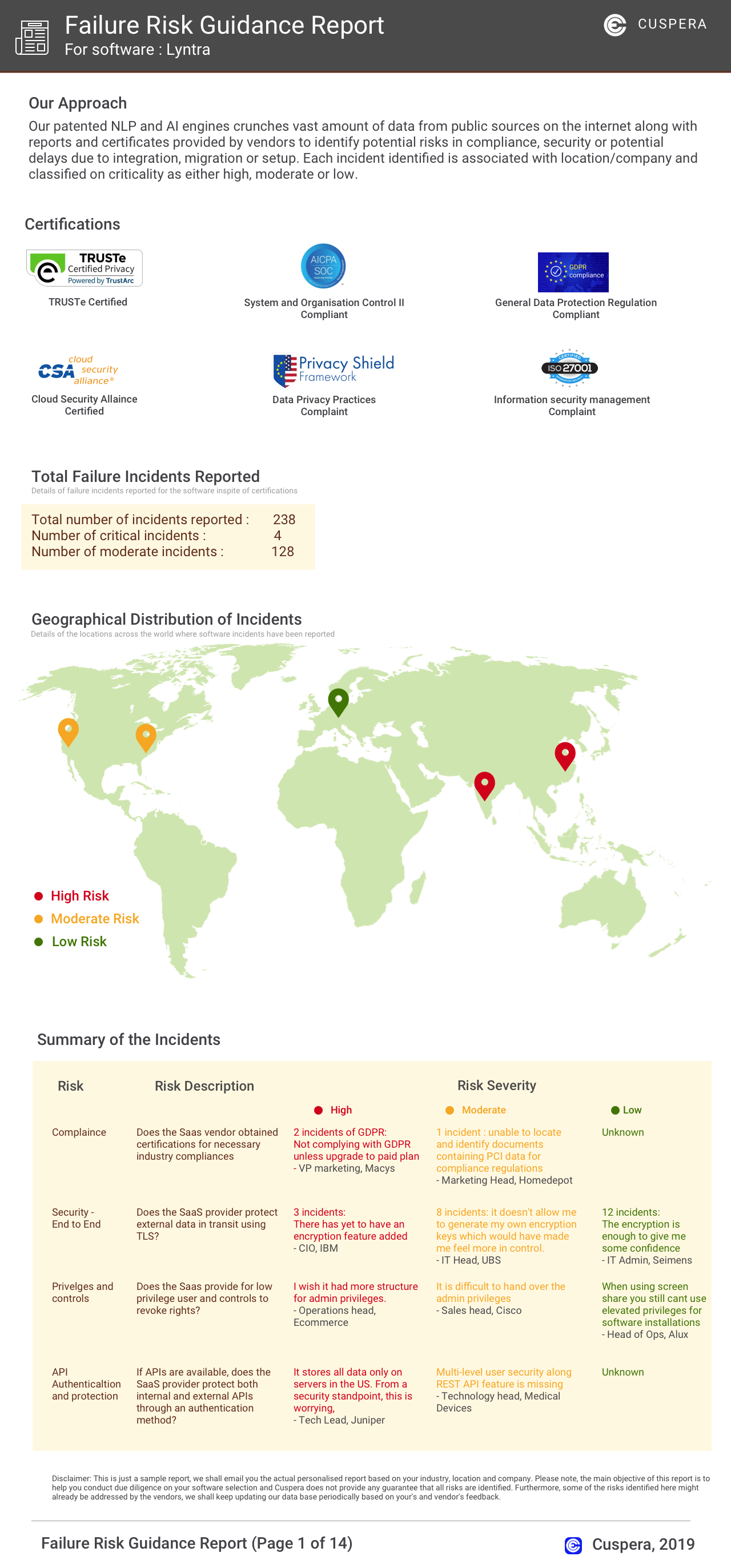
Software Failure Risk Guidance
?for FunctionFox
Overall Risk Meter
Top Failure Risks for FunctionFox
FunctionFox Systems Inc. Profile
Company Name
FunctionFox Systems Inc.
Company Website
https://www.functionfox.com/HQ Location
#2 - 415 Dunedin Street, Victoria, BC V8T 5G8, CA
Employees
11-50
Social


Financials
PRIVATE