


DashThis Overview
DashThis offers a streamlined solution for automating marketing reports, catering to analytics, SEM, and SEO needs. This platform enables users to generate visually appealing reports swiftly, integrating data from multiple marketing tools into a single dashboard. DashThis supports various report types, including social media, SEM, ecommerce, and SEO, providing a comprehensive view of marketing performance. The platform's user-friendly interface and preset report templates save significant time, allowing businesses to focus on strategic decision-making. Its white-label capabilities and seamless data connection enhance customization and reporting efficiency, making it a valuable tool for organizations aiming to optimize their marketing analytics.
Use Cases
Customers recommend Advertisement, Social Media Analytics, Digital Marketing, as the business use cases that they have been most satisfied with while using DashThis.
Business Priorities
Acquire Customers and Improve ROI are the most popular business priorities that customers and associates have achieved using DashThis.
DashThis Use-Cases and Business Priorities: Customer Satisfaction Data
DashThis works with different mediums / channels such as Social Media. Facebook. Display Advertisement etc.
DashThis's features include Dashboard, Templates, SEM, etc. and DashThis support capabilities include 24/7 Support, Phone Support, Email Support, etc. also DashThis analytics capabilities include Analytics, and Custom Reports.
Reviews
"The biggest benefit is the time saved in terms of data collection. It's also great that the design is very pretty out of the box." - Jonas M
Peer review evidence (same sources as the product rating summary)
"...The number of data sources it integrates with---AdWords, Bing Ads, Google Analytics, Facebook Ads, etc---reduces our time to create live data reports...." Peer review by Jamie M., Principal
"...See our social media report template SEM dashboard report...." Marketing Reporting Dashboards For Analytics, SEM & SEO
"...Dashthis is a cloud-based digital marketing dashboard solution designed for sales and marketing purposes...." 5 SEO Reporting Dashboards
DashThis, Hevo, Skyvia Platform, Reportz, Databox, etc., all belong to a category of solutions that help Business Intelligence. Each of them excels in different abilities. Therefore, determining the best platform for your business will depend on your specific needs and requirements.
DashThis provides automated marketing, analytics, SEM, and SEO reports for quick insights. Users can start a free trial to experience streamlined reporting.
Popular Business Setting
for DashThis
Top Industries
- Marketing and Advertising
- Internet
- Information Technology and Services
Popular in
- Small Business
- Mid Market
- Large Enterprise
DashThis is popular in Marketing And Advertising, Internet, and Information Technology And Services and is widely used by Small Business, Mid Market, and Large Enterprise.
DashThis Customer wins, Customer success stories, Case studies
What benefits does DashThis offer for Advertisement?
What solutions does DashThis provide for Digital Marketing?
How does DashThis address your White Labeling Challenges?
What solutions does DashThis provide for Campaign Management?
| CUSTOMERS | TESTIMONIALS |
|---|---|

|
The biggest benefit is the time saved in terms of data collection. It's also great that the design is very pretty out of the box. Testimonial By Jonas M |
|
|
We've played around with countless reporting tools over the years but none of them come anywhere close to Dashthis. The level of integration and customization of reports, as well as their outstanding client support are unrivalled! Testimonial By Hadrien B |
|
|
DashThis allows me to quickly and easily get my clients key multi-channel performance metrics in one easy to digest report! Testimonial By Dave A |
| CUSTOMERS | TESTIMONIALS |
|---|---|
|
Jonas M Digital Marketing Strategist GnuWorld |
The biggest benefit is the time saved in terms of data collection. It's also great that the design is very pretty out of the box. Testimonial By Jonas M |
|
Hadrien B Director Reef Digital Agency |
We've played around with countless reporting tools over the years but none of them come anywhere close to Dashthis. The level of integration and customization of reports, as well as their outstanding client support are unrivalled! Testimonial By Hadrien B |
|
Dave A Technical SEO Consultant Organic Digital |
DashThis allows me to quickly and easily get my clients key multi-channel performance metrics in one easy to digest report! Testimonial By Dave A |
How to customize a dashboard with DashThis
Frequently Asked Questions (FAQ)
What buyers ask before choosing DashThis
Integrations What CRM integrations are available with DashThis?
DashThis offers seamless integration with several popular CRM platforms, allowing users to consolidate their marketing data into comprehensive dashboards. Notably, DashThis integrates with HubSpot and Klaviyo, enabling users to pull in email, SMS, and e-commerce data directly via API. This integration ensures that your CRM metrics are always up-to-date without the need for manual exports or data handling. Additionally, DashThis supports a CSV file manager, allowing you to upload data from other CRM systems not directly integrated, ensuring you can still create insightful reports. With over 34 integrations available, DashThis makes it easy to combine CRM data with analytics, advertising, SEO, and social media metrics, providing a holistic view of your marketing performance.
Integrations How does DashThis connect to HubSpot and Salesforce?
DashThis connects to HubSpot and Salesforce through seamless API integrations, allowing users to pull data directly from these platforms into their reporting dashboards. For HubSpot, DashThis consolidates various marketing metrics, including email performance and sales reporting, enabling businesses to visualize their inbound marketing efforts effectively. Similarly, when integrating with Salesforce, DashThis helps users track sales performance and customer interactions, providing a comprehensive view of business operations. This integration eliminates the need for manual data exports or spreadsheets, ensuring that your dashboards are always up-to-date with the latest information from both HubSpot and Salesforce. By leveraging these connections, businesses can create customized reports that reflect their unique KPIs and marketing strategies, ultimately enhancing decision-making and performance analysis.
Integrations What are the setup steps for integrating DashThis with Marketo?
To integrate DashThis with Marketo, start by logging into your DashThis account and navigating to the integrations section. From there, select Marketo from the list of available integrations. You will need to authenticate your Marketo account by entering your API credentials, which can be found in your Marketo admin settings. Once authenticated, you can choose the specific data you want to pull into your DashThis dashboards, such as lead metrics, campaign performance, and other relevant analytics. After selecting your desired data sources, save your settings, and DashThis will automatically begin pulling in your Marketo data, allowing you to create comprehensive reports without manual exports or spreadsheets. This seamless integration helps you visualize your marketing efforts effectively and saves you valuable time.
Integrations Can I use DashThis with data providers like Snowflake or BigQuery?
Yes, you can use DashThis with data providers like Snowflake and BigQuery. DashThis supports integration with various data sources, allowing you to pull in data seamlessly for your reporting needs. While the platform primarily focuses on marketing tools and analytics, you can also utilize CSV files to import data from Snowflake or BigQuery if direct integration is not available. This flexibility enables you to create comprehensive dashboards that reflect your business's performance across multiple channels. By leveraging DashThis, you can save time on manual reporting and focus on deriving insights from your data, ultimately enhancing your decision-making process and improving client outcomes.
Integrations What is the data flow between DashThis and Google Analytics?
The data flow between DashThis and Google Analytics (GA4) is designed to be seamless and automated, allowing marketers to efficiently visualize their analytics data. When you connect Google Analytics to DashThis, the platform automatically pulls in key metrics such as website traffic, engagement, conversions, and eCommerce performance without the need for manual exports or spreadsheets. This integration enables users to create customized dashboards that update in real-time, combining Google Analytics data with other marketing sources like Google Ads and social media metrics. As a result, users can easily track and analyze their performance, share insights with clients or stakeholders through scheduled reports or live links, and maintain alignment across their marketing efforts, all while saving time and reducing the complexity of data management.
Integrations Are there any limitations to the integrations offered by DashThis?
DashThis offers over 30 integrations with popular marketing platforms across various categories, including analytics, advertising, SEO, social media, and ecommerce, allowing users to pull data seamlessly into one reporting dashboard. While there are no limitations on the number of integrations you can connect to a single dashboard, the total number of dashboards and data sources available depends on your specific DashThis plan. Additionally, all integrations can be set up easily without requiring technical knowledge or manual data handling, ensuring a user-friendly experience. However, it’s important to note that while DashThis strives to accommodate customer feedback for new integrations, the availability of specific integrations may vary based on demand and development priorities.
Features What does the automated reporting feature in DashThis do?
The automated reporting feature in DashThis simplifies the reporting process for digital agencies and marketers by allowing users to create custom marketing reports without the tedious manual work of data collection and formatting. This feature connects seamlessly with various marketing tools, such as Google Analytics, Facebook Insights, and HubSpot, enabling users to pull data from multiple sources into one comprehensive report. With preset templates and widgets, users can quickly generate visually appealing reports that showcase key performance indicators (KPIs) and campaign results. By automating the report generation and dispatching process, DashThis saves valuable time, allowing marketers to focus on strategy and execution rather than the repetitive task of compiling data, ultimately enhancing productivity and client satisfaction.
Features How do I create and save custom templates in DashThis?
Creating and saving custom templates in DashThis is a straightforward process designed to enhance your reporting efficiency. Start by logging into your DashThis account and selecting the "Create New Dashboard" option. From there, you can choose from various pre-built templates or start from scratch. Customize your dashboard by adding the specific metrics and data sources relevant to your needs, such as Google Analytics or social media platforms. Once you’ve tailored the layout and design to reflect your branding, simply click on the "Save Template" option to store your custom configuration. This allows you to easily access and reuse your templates for future reports, ensuring consistency and saving time as your business grows.
Features What are the preset templates available in DashThis and how do I use them?
DashThis offers a variety of preset templates designed to streamline the reporting process for different marketing campaigns, including eCommerce and social media. These templates come pre-loaded with relevant KPIs and widgets tailored to specific data sources, allowing users to quickly generate insightful reports without starting from scratch. To use these templates, simply select the desired template from the DashThis library, customize it as needed to fit your branding and specific metrics, and then plug in your data sources. This user-friendly approach not only saves time but also ensures that your reports are comprehensive and visually appealing, making it easier to communicate results to your team or clients. With unlimited access to these templates, you can efficiently manage multiple campaigns and adapt as your business grows.
Features How do I add password protection to my dashboards in DashThis?
To add password protection to your dashboards in DashThis, first log into your DashThis account and navigate to the dashboard you wish to secure. Once you have the desired dashboard open, look for the settings or options menu, where you will find the feature for password protection. Enable this feature and set a strong password that users will need to enter to access the dashboard. This ensures that only authorized individuals can view your data, enhancing security for sensitive information. Additionally, you can create a unique URL for each dashboard, further controlling access. Remember to communicate the password to your intended audience securely, ensuring that your data remains protected while still being accessible to those who need it.
Features What customization options are available for dashboards in DashThis?
DashThis offers extensive customization options for dashboards, allowing users to create reports that truly reflect their brand identity. You can personalize your dashboards by adding your logo, selecting custom color themes, and adjusting layouts to suit your specific needs. The platform also features a custom widget editor, enabling you to display metrics and dimensions in a way that best communicates your data. Additionally, DashThis provides white label options, allowing you to remove any DashThis branding and use your own custom domain for a seamless brand experience. With these capabilities, businesses can ensure their reports are not only informative but also visually aligned with their branding, enhancing professionalism and client engagement.
Features How do I automate report dispatching in DashThis?
To automate report dispatching in DashThis, start by creating your report and customizing it to fit your needs. Once your report is ready, navigate to the sharing options where you can set up mailing or report groups for each report. Here, you can specify the dispatch frequency, choosing from options like daily, weekly, or monthly, or even set a custom schedule that suits your business needs. Additionally, you can include a link to the online version of your report, provide a summary for your clients, or send a PDF version directly to their inbox. This automation feature not only saves you time but also ensures that your reports reach your audience consistently and efficiently, allowing you to focus on optimizing your marketing strategies.
ROI & pricing What measurable business outcomes can I expect from using DashThis?
Using DashThis can lead to several measurable business outcomes that significantly enhance your marketing efforts. By automating the reporting process, businesses can save substantial time—Jelly Marketing, for instance, reported saving over 20 hours per month, allowing their team to focus more on client work rather than manual reporting. DashThis provides a comprehensive view of marketing performance by integrating data from various sources like Google Ads, Analytics, and Facebook, enabling better decision-making and strategy adjustments. The platform's customizable dashboards and preset report templates help in delivering visually appealing and branded reports, which can improve client satisfaction and retention. Ultimately, these efficiencies and insights can lead to increased ROI, better allocation of marketing budgets, and improved overall business performance.
ROI & pricing How does DashThis improve ROI for marketing agencies?
DashThis improves ROI for marketing agencies by automating the reporting process, allowing agencies to save time and resources that can be redirected towards strategic initiatives and client engagement. By integrating data from various platforms such as SEO, PPC, and social media into customizable dashboards, DashThis provides clear insights into campaign performance, enabling agencies to demonstrate value to clients effectively. The ability to generate client-ready reports quickly and schedule them for regular updates ensures that stakeholders are consistently informed, fostering trust and transparency. Additionally, the tool's user-friendly interface and preset templates streamline the reporting process, reducing the manual effort involved and allowing agencies to focus on optimizing campaigns for better results, ultimately leading to improved ROI.
ROI & pricing What are the different pricing plans available for DashThis?
DashThis offers clear and straightforward pricing plans based on the number of dashboards you need, rather than charging per client, source, or integration. Each plan includes access to all features, such as unlimited users, preset report templates, and over 30 marketing platform integrations, including Google Analytics and Facebook. This means you can create comprehensive reports without worrying about additional fees for adding data sources or users. Additionally, you can easily change your plan at any time from within your account, and if you’re a nonprofit, you can benefit from a 30% discount on the regular pricing. Overall, DashThis provides flexible options to suit various reporting needs while ensuring you have all the necessary tools at your disposal.
ROI & pricing How can DashThis help in reducing costs for my marketing team?
DashThis can significantly reduce costs for your marketing team by automating the reporting process, which traditionally consumes a considerable amount of time and resources. By integrating data from various platforms such as SEO, PPC, and social media into customizable dashboards, DashThis eliminates the need for manual report creation, allowing your team to save over 20 hours per month, as experienced by users like Jelly Marketing. This time-saving translates into lower labor costs and enables your team to focus on high-value activities that drive client results. Additionally, DashThis offers unlimited users and support without hidden fees, ensuring you only pay for what you use, further optimizing your budget. Overall, DashThis streamlines reporting, enhances efficiency, and ultimately contributes to a more cost-effective marketing operation.
ROI & pricing What is the total cost of ownership for using DashThis over time?
The total cost of ownership for using DashThis over time includes several factors that contribute to its overall value. DashThis offers unlimited users across all plans, which means you won't incur additional costs as your team grows, making it a cost-effective solution for businesses of any size. Additionally, the platform provides time-saving features such as preset report templates, cloning options, and over 30 integrations, which reduce the time spent on manual reporting and allow your team to focus on more strategic tasks. While specific pricing details may vary based on the plan you choose, the efficiency gained from automating reporting processes can lead to significant savings in labor costs and improved productivity, ultimately enhancing your return on investment.
ROI & pricing How quickly can I see value from implementing DashThis in my reporting process?
You can see value from implementing DashThis in your reporting process almost immediately. The platform is designed for quick setup, allowing you to connect your data sources and start building dashboards within minutes. With preset report templates and widgets, you can easily visualize your marketing metrics without any technical expertise. This means you can automate the collection and presentation of your data, saving you significant time and effort compared to manual reporting methods. Many users report that they experience enhanced insights and improved decision-making shortly after integrating DashThis, as it consolidates data from various platforms like Google Ads, Analytics, and Facebook into one comprehensive view. Overall, DashThis streamlines your reporting process, enabling you to focus on strategy rather than data compilation.
Capabilities What reporting features does DashThis offer for digital marketing?
DashThis offers a comprehensive suite of reporting features tailored for digital marketing, designed to streamline the reporting process and enhance business performance. Users benefit from an easy-to-use drag-and-drop interface that allows for customization without needing IT support. Key features include preset report templates, cloning options, and preset widgets, which facilitate quick report creation. DashThis also supports unlimited data sources and integrates seamlessly with major SEO, web analytics, and digital marketing tools, automating data fetching and visualization. Additionally, users can add expert insights directly into reports, schedule automated report dispatching, and utilize white label options for branding. This all-in-one reporting solution empowers digital marketers to create clear, concise reports that effectively showcase campaign performance across multiple channels.
Capabilities Can DashThis automate client reporting for SEO and PPC campaigns?
Yes, DashThis can automate client reporting for both SEO and PPC campaigns, making it an ideal solution for agencies and marketers looking to streamline their reporting processes. With DashThis, users can connect various marketing tools, including Google Analytics 4, Google Business Profile, SEMrush, Moz, and Ahrefs, to gather data from multiple sources into a single, customizable dashboard. This automation allows for the creation of client-ready reports that update in real time, ensuring that stakeholders receive the most current insights without the need for manual data entry. By automating these reports, DashThis helps users save time and focus on optimizing their marketing strategies, ultimately enhancing the value they provide to their clients.
Capabilities Does DashThis support multiple data sources for comprehensive reporting?
Yes, DashThis supports multiple data sources for comprehensive reporting, making it an ideal solution for businesses looking to consolidate their marketing data. With over 30 integrations available, you can easily connect popular marketing platforms across analytics, advertising, SEO, and social media to create all-in-one dashboards. If a specific data source isn't supported, you can simply upload a CSV file to include that data in your reports. This flexibility allows you to combine various accounts and pages, ensuring that all your marketing efforts are represented in a single, visually appealing report. By utilizing DashThis, you can save time on manual reporting and focus on delivering value to your clients.
Capabilities Can I create customizable dashboards with DashThis for my marketing team?
Yes, you can create customizable dashboards with DashThis for your marketing team. The platform is designed to allow users to easily connect their marketing data from over 30 popular platforms, including analytics, advertising, SEO, social media, and ecommerce, without any technical setup. DashThis provides extensive customization options, enabling you to tailor dashboards to reflect your specific branding needs, such as adding logos, colors, and layouts. You can also choose from preset widgets and select the key performance indicators (KPIs) that matter most to your team. This flexibility not only streamlines reporting but also helps present data in a visually appealing way, making it easier for your marketing team to analyze performance and share insights with stakeholders.
Capabilities Is DashThis suitable for scaling marketing agencies with unlimited user access?
Yes, DashThis is highly suitable for scaling marketing agencies, particularly due to its unlimited user access feature. This allows all team members to collaborate seamlessly without incurring additional costs, making it an economical choice as your agency grows. The platform is designed specifically for marketing professionals, offering an easy-to-use interface that simplifies the reporting process. With DashThis, you can create comprehensive reports that pull data from multiple sources, thanks to over 30 integrations available. Additionally, the platform provides time-saving features like preset templates and automated reporting, which help agencies focus more on client projects rather than administrative tasks. Overall, DashThis supports scalability by providing the necessary tools and flexibility for growing marketing teams.
Capabilities Does DashThis provide customer support for setting up and using the platform?
Yes, DashThis provides exceptional customer support for both setting up and using the platform. Every plan includes free onboarding and demo calls, ensuring that you have the guidance needed to get started effectively. Their customer service team is renowned for being responsive and helpful, offering unlimited email and video support to assist you with any questions or challenges you may encounter. Whether you're a new user or looking to optimize your reporting processes, DashThis is committed to making your experience as seamless as possible. This level of support not only helps you navigate the platform but also empowers you to maximize the value of your marketing data through effective reporting.
Use cases How can SDRs use DashThis to streamline their reporting processes?
Sales Development Representatives (SDRs) can leverage DashThis to streamline their reporting processes by utilizing its user-friendly interface and powerful integration capabilities. By connecting various data sources such as CRM systems, email marketing platforms, and social media analytics, SDRs can create comprehensive dashboards that visualize their outreach efforts and performance metrics in real-time. The drag-and-drop report builder allows SDRs to customize reports easily, focusing on key performance indicators that matter most to their goals. Additionally, with preset report templates and the ability to automate report generation on a customizable schedule, SDRs can save time and reduce manual reporting tasks, enabling them to focus more on engaging with prospects and driving conversions. Overall, DashThis enhances efficiency and clarity in reporting, making it an invaluable tool for SDRs.
Use cases What are the best practices for marketers to implement DashThis in their campaign workflows?
To effectively implement DashThis in your campaign workflows, start by defining your key performance indicators (KPIs) to ensure your reports focus on the most relevant metrics. Utilize DashThis's preset report templates to save time and maintain consistency across reports. Integrate all your marketing platforms, such as Google Analytics and HubSpot, to consolidate data and gain a comprehensive view of your campaigns. Regularly update your dashboards to reflect real-time data, leveraging DashThis's automatic data fetching feature to minimize manual work. Customize your reports with branding elements like logos and colors to enhance professionalism when presenting to clients. Finally, encourage team collaboration by sharing dashboards and insights, fostering a data-driven culture that can lead to more informed decision-making and improved campaign performance.
Use cases In what scenarios should sales leaders consider using DashThis for performance tracking?
Sales leaders should consider using DashThis for performance tracking in scenarios where they need to streamline reporting processes and gain comprehensive insights into their sales metrics. If your team is overwhelmed by manual data collection from various sources, DashThis automates this process, allowing you to focus on strategy rather than data entry. It is particularly beneficial for tracking key performance indicators (KPIs) across multiple channels, providing a unified view of sales performance alongside marketing efforts. Additionally, if you require customizable reports that can be easily shared with stakeholders, DashThis offers preset templates and a user-friendly interface that simplifies report generation. This makes it an ideal solution for sales leaders looking to enhance their reporting efficiency and improve decision-making based on real-time data insights.
Use cases How can RevOps teams leverage DashThis for real-time data analysis and reporting?
RevOps teams can leverage DashThis for real-time data analysis and reporting by utilizing its powerful integration capabilities with various marketing platforms, allowing them to pull in data from multiple sources seamlessly. By setting up customizable dashboards, teams can visualize key performance indicators and metrics that matter most to their operations, ensuring they have up-to-date insights at their fingertips. The ability to automate report generation and schedule updates means that RevOps teams can focus on strategic decision-making rather than manual data collection. Additionally, DashThis's preset templates and widgets simplify the reporting process, enabling teams to create comprehensive reports that reflect their brand and communicate insights effectively to stakeholders. This streamlined approach not only enhances collaboration but also drives data-driven decisions across the organization.
Use cases What specific challenges can DashThis help marketing agencies overcome in their reporting tasks?
DashThis helps marketing agencies overcome several specific challenges in their reporting tasks by automating the data collection process from various platforms such as SEO, PPC, social media, and analytics tools. This automation significantly reduces the time spent on manual reporting, allowing agencies to focus more on strategy and client engagement. Additionally, DashThis offers customizable dashboards and white-label options, enabling agencies to present professional reports that align with their branding. The platform's user-friendly interface eliminates the need for advanced reporting skills, making it accessible for all team members. Furthermore, DashThis allows for the integration of expert insights directly into reports, streamlining communication with clients and enhancing the overall reporting experience. By addressing these challenges, DashThis empowers agencies to deliver timely, accurate, and visually appealing reports that demonstrate the value of their marketing efforts.
Use cases When is the ideal time for a marketing team to adopt DashThis for their reporting needs?
The ideal time for a marketing team to adopt DashThis for their reporting needs is when they are looking to streamline their reporting processes and enhance the efficiency of their marketing efforts. If your team is spending excessive hours manually compiling reports from various data sources, or if you need to present comprehensive insights to stakeholders regularly, it's time to consider DashThis. This automated reporting tool allows for customizable dashboards that integrate data from SEO, PPC, social media, and analytics platforms, making it easier to generate client-ready reports. Additionally, if your team is expanding or managing multiple clients, DashThis's unlimited user feature and preset report templates can significantly save time and improve collaboration. Adopting DashThis early in your reporting journey can help establish a solid foundation for data-driven decision-making and demonstrate ROI effectively.
Alternatives What are the best alternatives to DashThis for marketing agencies?
When considering alternatives to DashThis for marketing agencies, several notable options stand out. AgencyAnalytics is a popular choice, offering robust reporting features tailored for agencies, while HubSpot provides a comprehensive marketing platform with reporting capabilities integrated into its CRM. Klipfolio is another alternative, known for its customizable dashboards and data visualization tools. Additionally, Databox and Tableau are strong contenders, with Databox focusing on performance tracking and Tableau excelling in data analysis and visualization. Each of these tools has its unique strengths, so the best choice will depend on your specific reporting needs, budget, and the level of customization you require for your marketing campaigns.
Alternatives How does DashThis compare to Databox in terms of features and usability?
DashThis and Databox both serve as analytics tools, but they cater to different user needs, particularly for marketers and agencies. DashThis is specifically designed for creating custom dashboard reports, offering an easy-to-use interface that requires no coding, allowing users to visualize data quickly and efficiently. It features over 34 integrations, enabling users to consolidate various data sources into one comprehensive dashboard. In contrast, Databox also provides robust reporting capabilities but may not be as tailored for agency-specific needs. Users often find DashThis more intuitive for generating client reports, thanks to its drag-and-drop functionality and branding options. Ultimately, while both tools offer valuable features, DashThis stands out for its focus on simplifying the reporting process for marketing professionals.
Alternatives What differentiates DashThis from Cyfe for digital marketing reporting?
DashThis differentiates itself from Cyfe in several key areas tailored specifically for digital marketing reporting. While both tools offer dashboard capabilities, DashThis is designed exclusively for marketers and agencies, providing a user-friendly interface that allows for easy customization of reports without the need for coding or IT support. DashThis excels in creating visually appealing, interactive reports that can seamlessly integrate over 30 marketing data sources, making it ideal for showcasing results to clients. Additionally, DashThis is renowned for its exceptional customer support, ensuring users receive personalized assistance regardless of their plan. In contrast, Cyfe may offer broader business intelligence features but lacks the specialized focus and aesthetic appeal that DashThis provides for marketing professionals.
Alternatives Is DashThis a better choice than AgencyAnalytics for creating marketing reports?
DashThis and AgencyAnalytics both serve as powerful tools for creating marketing reports, but they cater to different needs and preferences. DashThis is particularly favored for its user-friendly interface, visually appealing reports, and the ability to accommodate unlimited users, making it an excellent choice for marketing agencies that prioritize ease of use and aesthetics. Additionally, DashThis allows users to consolidate multiple data sources into a single report, streamlining the reporting process. On the other hand, AgencyAnalytics may offer more advanced features for specific analytics needs, which could be beneficial for some users. Ultimately, the choice between DashThis and AgencyAnalytics depends on your agency's specific requirements, such as the importance of report design versus advanced analytics capabilities.
Alternatives What are the unique strengths of DashThis compared to Klipfolio?
DashThis offers several unique strengths compared to Klipfolio, making it an ideal choice for marketing agencies and professionals. One of its standout features is the unlimited user access included in all plans, allowing teams to collaborate without incurring extra fees. DashThis is specifically designed for marketers, providing a user-friendly interface that simplifies the creation of visually appealing reports tailored to client needs. Additionally, it boasts over 30 marketing integrations, including direct connections to platforms like Klaviyo, enabling seamless data aggregation without the need for programming. Personalized customer support is another significant advantage, ensuring users receive dedicated assistance regardless of their plan. Overall, DashThis combines ease of use, comprehensive features, and exceptional support, positioning it as a compelling alternative to Klipfolio for marketing reporting.
Alternatives Why should I switch from Swydo to DashThis for my marketing reporting needs?
Switching from Swydo to DashThis for your marketing reporting needs offers several compelling advantages tailored specifically for marketing agencies. DashThis provides a user-friendly interface that requires no coding or IT experience, allowing you to create beautiful, interactive dashboards effortlessly through drag-and-drop functionality. With over 30 data integrations available and unlimited users included in every plan, DashThis eliminates the hassle of additional costs for team members, making it a cost-effective solution. Furthermore, DashThis focuses exclusively on marketing reporting, ensuring that all features are designed with marketers in mind, unlike Swydo. The platform also offers exceptional customer support, ensuring you have assistance whenever needed. Overall, DashThis streamlines your reporting process, enhances data visualization, and saves you time and money, making it a superior choice for your agency's reporting needs.
DashThis Competitors


DashThis Features
- Low
- Medium
- High
| FEATURE | RATINGS AND REVIEWS |
|---|---|
| AI Powered | Read Reviews (1) |
| Analytics | Read Reviews (109) |
| Custom Reports | Read Reviews (643) |
| CAPABILITIES | RATINGS AND REVIEWS |
|---|---|
| AI Powered | Read Reviews (1) |
| Analytics | Read Reviews (109) |
| Custom Reports | Read Reviews (643) |
DashThis Integrations
DashThis integrates with a wide range of software applications through its robust data import and export capabilities.


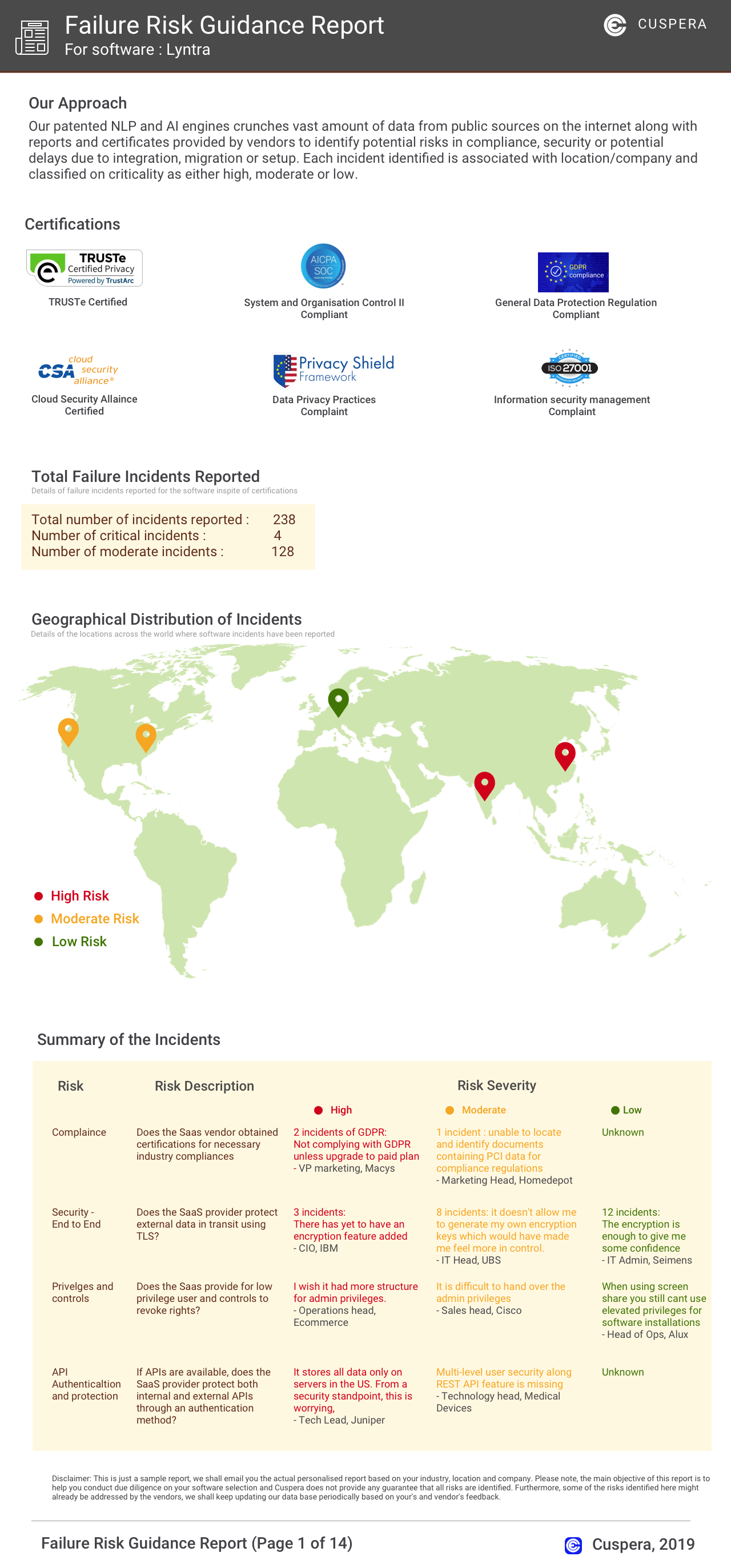
Software Failure Risk Guidance
?for DashThis
Overall Risk Meter
Top Failure Risks for DashThis
Moment Zero Inc. News
Introducing ChatGPT Ads Integration: Now Live in DashThis
DashThis has launched a new ChatGPT Ads integration, now in open beta, allowing users to track and report on ChatGPT Ads alongside other platforms like Google and Meta. This integration streamlines ad performance tracking and reporting, offering features like performance comparison, ROI demonstration, and automated report delivery.
Moment Zero Inc. Profile
Company Name
Moment Zero Inc.
Company Website
https://dashthis.com/HQ Location
1255 Boulevard Lebourgneuf, #550, Québec, Québec G2K 0M6, CA
Employees
11-50
Social


Financials
M&A

Why is DashThis the best choice for Social Media Analytics?