Giva Overview
Giva's cloud platform delivers a comprehensive suite of web-based solutions for help desk, customer service, and IT service management. Its intuitive design ensures rapid deployment within days and requires only an hour for training, making it highly accessible for businesses of all sizes. A standout feature is its AI-powered, HIPAA-compliant applications, which provide robust security and compliance, particularly beneficial for industries handling sensitive information. Giva's platform also encompasses IT change enablement, knowledge management, and IT asset management, offering a holistic approach to IT operations. This versatility allows organizations to streamline their service management processes while ensuring data safety and regulatory compliance, addressing key industry challenges.
Use Cases
Customers recommend Helpdesk Management, Customer Feedback Management, Workflow Management, as the business use cases that they have been most satisfied with while using Giva.
Business Priorities
Improve ROI and Acquire Customers are the most popular business priorities that customers and associates have achieved using Giva.
Giva Use-Cases and Business Priorities: Customer Satisfaction Data
Giva works with different mediums / channels such as Mobile. Phone Calls. and Mobile App.
Giva's features include Dashboard, Ticketing, Feedback Surveys, etc. and Giva support capabilities include Email Support, Chat Support, Phone Support, etc. also Giva analytics capabilities include Custom Reports, and Analytics.
Reviews
"...Giva eHelpDesk has allowed us to deliver a very high level of customer satisfaction at a cost approximately one-third the projected total cost of ownership of other solutions we considered...." Peer review by Lori Mazzola, National IT Project Manager, Epstein Becker & Green, P.C, Epstein Becker & Green
Peer review evidence (same sources as the product rating summary)
"...We're a busy Help Desk, and Giva gives us a fantastic tool for tracking issues, as well as escalating/communicating among the various groups in the IT Department...." Peer review by Robin H., Help Desk Supervisor, Legal Services
"...Now, Ive got excellent tools to measure performance, productivity and customer satisfaction...." Peer review by Elaine Tanner, Kupa Incorporated
"...Giva allowed us to shine a light on all of our workflows and identify areas where improvement was necessary...." Peer review by Shirley, Team CPR, Inc.
Giva, NinjaOne (formerly NinjaRMM), Cayzu Help Desk, Qminder, Vision Helpdesk, etc., all belong to a category of solutions that help Help Desk. Each of them excels in different abilities. Therefore, determining the best platform for your business will depend on your specific needs and requirements.
Giva's cloud customer service platform deploys in days and trains in one hour. It is highly customizable and offers top-notch reporting.
Popular Business Setting
for Giva
Top Industries
- Hospital & Health Care
- Legal Services
- Retail
Popular in
- Enterprise
- Mid Market
- Small Business
Giva is popular in Hospital & Health Care, Legal Services, and Retail and is widely used by Enterprise, Mid Market, and Small Business.
Giva Customer wins, Customer success stories, Case studies
What solutions does Giva provide for Helpdesk Management?
What makes Giva ideal for Customer Feedback Management?
How can Giva optimize your Workflow Management Workflow?
What makes Giva ideal for Knowledge Management?
How efficiently Does Giva manage your Contract Management?
Frequently Asked Questions (FAQ)
What buyers ask before choosing Giva
Integrations What CRM integrations are available with Giva?
Giva offers robust integration capabilities with various CRM systems to enhance customer service and support workflows. Currently, Giva has integrated its services with Active Directory using a REST-based API, allowing for seamless updates of employee data. While specific CRM integrations are not detailed in the provided context, Giva's architecture supports secure integration with any application, enabling technical teams to programmatically submit information to Giva's system. This flexibility allows organizations to connect Giva with popular CRM platforms like Salesforce or HubSpot, facilitating streamlined ticket creation and customer data management. As Giva continues to evolve, future integrations with platforms such as Microsoft Azure Active Directory Domain Services are also planned, ensuring that businesses can leverage their existing CRM systems effectively within Giva's IT Service Management suite.
Integrations How does Giva connect with Salesforce and other CRM tools?
Giva integrates seamlessly with Salesforce and other CRM tools, enhancing the functionality of your customer service and IT help desk operations. This integration allows for real-time data synchronization, enabling customer service agents to access critical information without switching between platforms, thus improving efficiency and response times. With Giva, users can create service tickets directly from Salesforce, ensuring that all customer interactions are logged and tracked effectively. Additionally, Giva's intuitive interface and robust API facilitate easy connections with various CRM systems, allowing businesses to customize their workflows according to specific needs. This integration not only streamlines processes but also enhances the overall customer experience by providing agents with comprehensive insights at their fingertips.
Integrations What steps are involved in setting up Giva's REST API for integration?
To set up Giva's REST API for integration, start by accessing the Giva API documentation, which provides detailed guidelines on authentication and endpoint usage. First, create an API key within your Giva account settings to ensure secure access. Next, familiarize yourself with the available endpoints that allow you to perform actions such as ticket creation and data synchronization. Use tools like Postman or cURL to test API calls and verify responses. Once you have confirmed the functionality, integrate the API into your application by writing the necessary code to handle requests and responses. Finally, ensure that your integration is robust by implementing error handling and logging for troubleshooting. This setup will enable seamless interaction between Giva and your third-party applications, enhancing your service management capabilities.
Integrations How does data flow between Giva and external applications?
Data flow between Giva and external applications is facilitated through Giva's robust integration capabilities, primarily utilizing its REST-based API and the Giva Redirection Service API. These tools allow for seamless synchronization of data, enabling external applications to programmatically submit information to Giva, such as creating service tickets or updating existing records. For instance, a telephony application can generate links that trigger ticket creation directly within Giva's cloud applications. This integration ensures that data remains consistent across platforms, enhancing operational efficiency and reducing manual entry errors. By leveraging these APIs, organizations can customize their workflows and ensure that Giva works harmoniously with their existing systems, ultimately improving service delivery and customer satisfaction.
Integrations Are there any limitations to Giva's API integrations?
Giva's API integrations are designed to enhance functionality and streamline workflows, but there are some limitations to consider. While Giva provides robust integration capabilities with various web forms and applications, the extent of these integrations may depend on the specific systems you wish to connect. For instance, while Giva can integrate with popular platforms, the depth of integration features may vary, potentially limiting certain functionalities. Additionally, users may encounter restrictions based on their subscription tier or the specific API endpoints available. It's essential to review Giva's API documentation for detailed information on supported integrations and any constraints that may apply, ensuring that your organization's needs align with what Giva's API can offer.
Integrations How can I configure Giva to sync with Active Directory or LDAP?
To configure Giva to sync with Active Directory (AD) or LDAP, you can utilize Giva's LDAP Synchronization Tool, which is designed for ease of use without requiring any coding. First, ensure that your AD/LDAP server is properly set up and accessible. Then, follow the steps in Giva's configuration guide to establish a secure HTTPS connection between your local database and Giva. This setup allows for automatic synchronization of user data, including moves, adds, and changes, ensuring that Giva always has the latest information. Additionally, you can customize the synchronization process by using Giva's REST-based API to include an unlimited number of custom fields beyond the default 32 profile fields. For detailed instructions, refer to Giva's Quick Start Guide or reach out to Giva Support for assistance.
Features What does the custom dashboards feature in Giva do?
The custom dashboards feature in Giva provides an intuitive and visually engaging way for customer support managers to monitor and analyze key performance metrics in real-time. These dashboards consist of movable widgets and charts that can be easily configured to display relevant data, allowing teams to focus on their priorities and enhance customer satisfaction. By visualizing data through colorful cards, Giva's dashboards help identify trends and correlations that may be overlooked in traditional spreadsheets. This feature not only aids in reducing call volume but also empowers decision-makers, such as Vice Presidents of Customer Service and CIOs, to articulate the value their organizations provide and improve overall profitability. With customizable reporting options, Giva ensures that users can tailor their dashboards to meet specific business needs, ultimately leading to more effective data-driven decision-making.
Features How do I set up and configure the reporting analytics in Giva?
To set up and configure the reporting analytics in Giva, start by logging into your Giva account and navigating to the "Reports" section in the top navigation menu. From there, you can access various report listings tailored to your company's modules. Utilize the handy filters on the right side to find specific reports that meet your needs. To create custom reports, select an "Easy Three-Click Reporting Analytics"™ template, customize it as needed, and save it under "My Saved Reports." You can also share these reports with colleagues by clicking "Save Report As" and adding a description. For ongoing insights, consider scheduling automatic email deliveries of your reports. Giva's intuitive interface allows you to manage and customize your reporting analytics efficiently, enabling data-driven decision-making for your organization.
Features What is the process for using the email to ticket feature in Giva?
The process for using the email to ticket feature in Giva involves several straightforward steps to streamline customer support. First, configure email forwarding rules to ensure that all incoming client communications are automatically converted into tickets. You can set specific rules to assign predetermined statuses, severity levels, SLAs, and categories based on keywords found in the email's subject and body. Once the rules are established, Giva will automatically create tickets from incoming emails, allowing agents to manage and respond to them efficiently. Additionally, agents can utilize features like quick tickets, macros, and keyboard shortcuts to expedite their responses. This system not only enhances productivity but also ensures that customer inquiries are tracked and addressed promptly, improving overall customer satisfaction.
Features How can I utilize the multiple service desks feature in Giva?
To utilize the multiple service desks feature in Giva, you can create independent instances for different departments within your organization, such as IT, Customer Service, and Facilities. Each service desk can be uniquely configured with its own service groups, severity levels, statuses, and business rules, allowing for tailored functionality that meets the specific needs of each department. When logging into Giva, users can select the appropriate service desk from a dropdown menu, enhancing navigation and ensuring that agents and customers are directed to the correct support resources right from the start. This feature not only streamlines operations but also improves user experience by providing relevant access and information based on departmental requirements.
Features What functionalities are included in Giva's simplified user interface?
Giva's simplified user interface includes a range of functionalities designed to enhance user experience and operational efficiency. The platform features an intuitive layout that allows for effortless navigation, making it easy for team members to access essential tools without unnecessary clutter. Key functionalities include service ticket creation and editing through macros, a knowledge base for quick information retrieval, and modules for customer service, asset management, and change management. Additionally, Giva's cloud-based architecture ensures that users can access the software from anywhere without the need for downloads or server maintenance, further streamlining the user experience. This focus on simplicity not only reduces the learning curve but also promotes faster adoption and increased productivity across teams.
Features How do I navigate and use the Giva ChangeManager™ Dashboard?
To navigate and use the Giva ChangeManager™ Dashboard effectively, start by accessing the home page where you'll find an intuitive layout featuring movable widgets, charts, and reports. Use the eight main navigation options to explore different functionalities, such as the "Dashboard" to return home or "Knowledge" to access knowledge articles. To initiate a search for knowledge articles, click "Find Knowledge" on your dashboard, enter relevant keywords or article numbers, and press Enter. You can also refine your search using quotes for exact phrases. For reporting, navigate to the "Reports" section in the top navigation bar to access a variety of categorized reports that provide insights into change management processes. This streamlined interface is designed to enhance your team's efficiency and decision-making capabilities.
ROI & pricing What measurable business value can Giva provide for my organization?
Giva provides measurable business value by streamlining support processes, enhancing efficiency, and improving employee satisfaction within organizations. Its IT Service Management (ITSM) solutions centralize support requests, allowing teams to manage inquiries more effectively and freeing up staff time for higher-value tasks. Giva's automation features, such as Macros and Quick Tickets, help organizations handle busy periods without increasing overhead, which is particularly beneficial for nonprofits with limited resources. Additionally, Giva's "Easy Three-Click Reporting Analytics"™ enables real-time performance monitoring and data-driven decision-making, ensuring that organizations can quickly generate insights to optimize their operations. By reducing the need for extensive vendor assistance and facilitating self-configuration, Giva empowers organizations to maximize their investment in technology while minimizing operational costs.
ROI & pricing How does Giva impact ROI and cost savings over time?
Giva significantly impacts ROI and cost savings over time by reducing the total cost of ownership (TCO) of service management tools by approximately 60% over a five-year period. Customers have reported substantial productivity improvements, such as a 70% increase in managing IT Change Management, which translates into savings of at least one full-time equivalent (FTE) due to minimal ongoing labor requirements. Additionally, Giva enhances operational efficiency, leading to reduced consumer call times by an average of 70% and an estimated 80% decrease in IT auditing costs. These efficiencies not only lower operational expenses but also improve customer satisfaction, ultimately driving a higher return on investment for businesses that implement Giva's solutions.
ROI & pricing What are the different pricing plans and tiers available for Giva?
Giva offers two distinct pricing plans: Professional and Enterprise, both designed to provide unlimited access to essential features. The Professional plan is priced at $69 per agent per month, while the Enterprise plan costs $89 per agent per month, both billed annually. Each plan includes unlimited storage, usage of the AI Copilot, routine technical support, and setup assistance from Giva's product experts. It's important to note that a minimum of five licenses is required to subscribe to either plan. This straightforward and transparent pricing structure ensures that businesses can scale their customer service and IT service management needs effectively without hidden costs, making Giva a flexible solution for organizations of varying sizes.
ROI & pricing What is the total cost of ownership when using Giva compared to other solutions?
The total cost of ownership (TCO) when using Giva is significantly lower compared to many other IT service management solutions. Giva is hosted in the cloud, eliminating the need for organizations to invest in servers or ongoing software management, which contributes to a reduced TCO by approximately 60% over five years, as reported by users. In contrast, other solutions may require substantial upfront investments and ongoing maintenance costs, leading to a higher TCO. Giva's model also minimizes labor requirements, allowing organizations to save on personnel costs, further enhancing its value proposition. By providing a customizable and integrated platform, Giva not only lowers costs but also improves productivity and customer satisfaction, making it a compelling choice for businesses looking to optimize their IT service management expenses.
ROI & pricing How quickly can I expect to see value from implementing Giva?
When implementing Giva, you can expect to see significant value almost immediately, particularly in areas like first contact resolution and customer satisfaction. Many users report a rapid increase in first contact resolution rates, with one client experiencing an improvement from 70% to 95% shortly after adopting Giva's help desk software. This quick turnaround is largely attributed to Giva's intuitive knowledge base, which empowers teams to resolve issues efficiently. Additionally, Giva offers a free 30-day trial, during which you can receive setup assistance from product experts, ensuring that you can start realizing benefits right away. By leveraging Giva's tools and resources, organizations can enhance their service delivery and improve overall operational efficiency in a matter of days.
ROI & pricing What are the estimated savings in labor and resources when using Giva?
When using Giva, businesses can expect significant savings in labor and resources. For instance, companies have reported a reduction in the total cost of ownership (TCO) of their Service Management tools by approximately 60% over a five-year period. Additionally, organizations have experienced up to a 70% improvement in productivity related to IT Change Management, which translates into saving at least one full-time equivalent (FTE) due to the minimal ongoing labor required to maintain the system. Furthermore, Giva has helped reduce consumer call times by an average of 70%, leading to enhanced efficiency and customer satisfaction. These metrics highlight Giva's potential to streamline operations and reduce costs effectively, making it a valuable investment for businesses looking to optimize their service management processes.
Capabilities What advanced reporting capabilities does Giva offer?
Giva offers advanced reporting capabilities through its "Easy Three-Click Reporting Analytics"™ system, which allows users to generate real-time, in-depth reports quickly and efficiently. The platform features customizable report templates that enable users to build, save, and share multiple versions of reports with various filters, making it easy to tailor insights to specific needs. Giva's reporting system includes full-color, high-contrast charts and graphs for enhanced data visualization, facilitating a better understanding of complex data relationships. Additionally, users can export reports in CSV or PDF formats and schedule autorun reports, significantly reducing report preparation time by up to 80%. This flexibility and user-friendliness empower businesses to make data-driven decisions swiftly, ultimately improving customer satisfaction and operational efficiency.
Capabilities Can Giva provide real-time analytics for performance metrics?
Yes, Giva can provide real-time analytics for performance metrics through its innovative "Easy Three-Click Reporting Analytics"™ feature. This functionality allows users to generate comprehensive reports quickly and efficiently, enabling businesses to monitor key performance indicators (KPIs) and other critical metrics in real-time. Giva's reporting analytics include customizable dashboards with full-color charts and graphs, making it easy to visualize data and understand relationships between various performance metrics. By leveraging these insights, organizations can make data-driven decisions that enhance team performance, reduce call volumes, and ultimately improve customer satisfaction. The ability to access real-time data ensures that leaders can respond promptly to emerging trends and issues, fostering a proactive approach to performance management.
Capabilities Does Giva support HIPAA compliance for healthcare organizations?
Yes, Giva fully supports HIPAA compliance for healthcare organizations, making it an ideal choice for those needing to protect sensitive patient information. Giva's HIPAA-compliant cloud IT help desk application is designed specifically for healthcare settings, ensuring that all electronic health records and patient health information are securely managed. The software includes HIPAA compliance at no additional cost, and it is backed by Giva’s cyber liability insurance policy, providing an extra layer of security. With features like data encryption, streamlined IT support, and robust reporting analytics, Giva helps healthcare organizations maintain compliance while enhancing operational efficiency. This commitment to security and compliance allows healthcare providers to focus on delivering quality care without the risk of data breaches or regulatory penalties.
Capabilities Can users create and schedule customizable reports in Giva?
Yes, users can create and schedule customizable reports in Giva. The platform allows you to build reports using templates that can be tailored with personalized filters and fields. Once you have customized your report, you can save it under a unique name and description for easy retrieval. Additionally, Giva offers a "Save and Add Schedule" option, enabling you to automate the emailing of reports at specified intervals. You can choose the report format, add recipient names, and set the delivery schedule, ensuring that relevant team members receive the latest data without manual intervention. This functionality enhances collaboration and keeps everyone informed, making Giva a powerful tool for managing reporting analytics.
Capabilities What security measures does Giva implement to protect user data?
Giva implements a comprehensive suite of security measures to protect user data, ensuring compliance with HIPAA, HITECH, and GDPR regulations. Our applications are hosted by DataBank, a leader in high-security hosting, which employs stringent physical security protocols, including monitored access and state-of-the-art surveillance systems. We utilize dynamic vulnerability scanning to continuously assess our code against the OWASP Top 10 security risks, and we conduct regular third-party penetration testing to identify and mitigate potential vulnerabilities. Logical access to our production network is highly restricted, employing least privilege principles and two-factor authentication for employees. Additionally, our 24/7 Operations and Network Engineering teams are on standby to respond to any security incidents, ensuring that user data remains secure and protected at all times.
Capabilities Does Giva offer tools for tracking key performance indicators (KPIs)?
Yes, Giva offers robust tools for tracking key performance indicators (KPIs) through its customizable dashboards and reporting features. Users can easily access relevant metrics and KPIs directly from their home page dashboard, allowing for real-time monitoring of team performance and productivity. Giva's reporting system is designed to be user-friendly, enabling even those without extensive reporting expertise to generate insightful reports quickly. The "Easy Three-Click Reporting Analytics"™ feature simplifies the process of pulling reports, making it efficient to analyze trends and patterns. This capability not only enhances data-driven decision-making but also significantly increases productivity by providing actionable insights that can be utilized immediately. Overall, Giva equips organizations with the necessary tools to effectively track and manage their KPIs, leading to improved operational efficiency.
Use cases How can SDRs use Giva to improve their customer support workflows?
Sales Development Representatives (SDRs) can leverage Giva to enhance their customer support workflows by utilizing its robust Help Desk features designed for efficiency and effectiveness. Giva allows SDRs to streamline communication with customers and internal teams, ensuring that inquiries are addressed promptly. The software's flexible reporting engine enables SDRs to generate regular performance reports, helping them identify trends and areas for improvement in customer interactions. Additionally, Giva's capabilities in tracking and managing support tickets can lead to a significant reduction in response times and an increase in first call resolution rates, as evidenced by testimonials from users who have experienced up to a 45% improvement in resolution metrics. By integrating Giva into their workflows, SDRs can ultimately enhance customer satisfaction and drive better business outcomes.
Use cases What are the best practices for implementing SLA-driven customer support workflows with Giva?
To implement SLA-driven customer support workflows effectively with Giva, start by clearly defining your service level agreements (SLAs) based on customer expectations and business needs. Utilize Giva’s intuitive interface to prioritize tickets by urgency, ensuring that agents can focus on high-impact issues first. Establish an early-warning system within Giva to alert teams of potential SLA breaches, allowing for timely escalations and proactive management. Regularly review and adjust SLAs to reflect changing customer demands and operational capabilities. Additionally, ensure that all team members have visibility into approaching deadlines and customer priorities, which can be facilitated through Giva’s reporting tools. Finally, gather feedback from your support team and customers to continuously refine workflows and improve responsiveness, ultimately enhancing customer satisfaction and reducing missed commitments.
Use cases In what scenarios should RevOps teams utilize Giva for managing clinical medical device support?
RevOps teams should utilize Giva for managing clinical medical device support in scenarios where there is a need for improved collaboration between IT, biomed, and clinical teams, especially in complex environments where devices directly impact patient care. Giva provides a structured workflow that centralizes device-related incident reporting, reducing reliance on informal communication methods like emails or verbal reports. This is particularly beneficial in settings where devices are shared across departments and shifts, as it clarifies ownership and accountability for device issues. Additionally, Giva's automation features, such as self-service portals for issue intake and real-time dashboards for performance tracking, enhance efficiency and allow clinical staff to focus more on patient care. By implementing Giva, RevOps teams can streamline operations, improve response times, and ultimately enhance the reliability of clinical devices.
Use cases How can sales leaders leverage Giva's reporting capabilities to enhance team performance metrics?
Sales leaders can leverage Giva's reporting capabilities to enhance team performance metrics by utilizing its "Easy Three-Click Reporting Analytics"™ to quickly generate custom reports that provide deep insights into employee productivity and key performance indicators. By accessing real-time data through Giva's user-friendly dashboards, sales leaders can monitor team performance effectively and identify emerging issues that may hinder productivity. The visually appealing charts and graphs facilitate a better understanding of data relationships, enabling leaders to make informed, data-driven decisions. Additionally, Giva's reporting tools allow for the objective evaluation of team performance, which can be instrumental in incentivizing and rewarding high-performing team members, ultimately driving overall efficiency and effectiveness within the sales team.
Use cases What specific challenges can Giva help marketing teams address in their customer service processes?
Giva can significantly enhance marketing teams' customer service processes by addressing several specific challenges. One key area is the integration of customer feedback into marketing strategies; Giva's platform allows for seamless communication between customer service and marketing teams, ensuring that insights from customer interactions are quickly relayed and acted upon. This tight integration helps in identifying trends and root causes of customer issues, enabling marketing teams to tailor their campaigns more effectively. Additionally, Giva's features, such as macros for rapid ticket creation and editing, streamline the resolution process, allowing marketing teams to respond to customer inquiries swiftly and efficiently. By reducing response times and improving issue resolution, Giva ultimately helps marketing teams enhance customer satisfaction and loyalty, driving better business outcomes.
Use cases How does Giva support distributed clinics in managing IT support effectively?
Giva supports distributed clinics in managing IT support effectively by providing a centralized, cloud-based IT help desk solution that is specifically designed for the unique challenges of behavioral health environments. With Giva, clinics can streamline IT support across multiple locations, ensuring that clinicians have quick access to necessary resources like scheduling software, EHR systems, and telehealth platforms. The platform enhances operational efficiency through automation of workflows, real-time performance dashboards, and a user-friendly interface that requires minimal training. Additionally, Giva's HIPAA-compliant architecture ensures that patient data remains secure while facilitating seamless collaboration among healthcare teams. This comprehensive approach not only reduces downtime during IT issues but also allows clinicians to focus more on patient care, ultimately improving the overall patient experience.
Alternatives What are the best alternatives to Giva for ITSM?
When considering alternatives to Giva for IT Service Management (ITSM), several notable options stand out. BMC® Helix Remedyforce™ offers a comprehensive ITSM solution with a focus on automation and integration, making it suitable for larger enterprises. Ivanti® ITSM is another competitor, known for its robust features but often criticized for complexity and slower deployment. ManageEngine™ provides a cost-effective ITSM platform with a wide range of functionalities, appealing to small to medium-sized businesses. Additionally, Zendesk and Freshdesk are popular choices for organizations seeking user-friendly interfaces and strong customer support capabilities. Each of these alternatives has its strengths, so the best choice will depend on your organization's specific needs, budget, and desired features.
Alternatives How does Giva compare to Ivanti ITSM in terms of productivity and cost savings?
Giva significantly outperforms Ivanti ITSM in both productivity and cost savings, making it a preferred choice for many organizations. Customers report a remarkable 50% to 80% increase in productivity after switching to Giva, thanks to its intuitive dashboards, custom forms, and robust reporting capabilities. In contrast, Ivanti ITSM often requires more vendor assistance for configuration and customization, which can hinder efficiency. Additionally, Giva's cloud-native platform eliminates downtime and reduces the total cost of ownership by approximately 60% over five years, providing substantial financial benefits. This combination of enhanced productivity and lower costs positions Giva as a superior alternative to Ivanti ITSM for businesses seeking to optimize their IT service management.
Alternatives What unique strengths does Giva have over BMC Footprints and Track-It!?
Giva stands out against BMC FootPrints and Track-It! due to its modern, cloud-based IT Service Management (ITSM) suite that emphasizes user experience, cost efficiency, and productivity. Giva's intuitive interface, reminiscent of Apple’s design philosophy, allows for easier navigation and quicker access to features, resulting in a 70% increase in IT productivity and a 65% boost in first-call resolution rates. Additionally, Giva offers significant cost savings, with a reported 70% reduction in total cost of ownership over three years compared to FootPrints. Its real-time dashboards and robust reporting tools empower teams to resolve issues swiftly, enhancing customer satisfaction. Overall, Giva's commitment to customer service and continuous improvement further solidifies its position as a superior alternative to both BMC FootPrints and Track-It!.
Alternatives Why should I choose Giva over Freshdesk for customer service management?
Choosing Giva over Freshdesk for customer service management offers several compelling advantages. Giva provides a full-featured service management suite with all modules bundled at a competitive flat rate, eliminating the tiered pricing structure that Freshdesk employs, which can lead to higher costs as your needs grow. Giva is known for its exceptional ease of use, allowing teams to navigate reports and dashboards without requiring extensive technical skills. Additionally, Giva consistently innovates with monthly updates and offers strong automation and powerful analytics, all while ensuring HIPAA compliance. Customers have praised Giva for its superior tech support and customization options, making it a smarter choice for organizations seeking both value and functionality in their customer service software.
Alternatives What differentiates Giva from ManageEngine in the help desk software market?
Giva differentiates itself from ManageEngine in the help desk software market primarily through its user-friendly interface and superior customer support. Giva is recognized as the most user-friendly help desk, customer service, knowledgebase, asset management, and change management software available, allowing teams to operate efficiently without the need for extensive vendor assistance. In contrast, users have reported challenges with ManageEngine's support, particularly due to time zone differences affecting response times. Giva's cloud-based platform eliminates the need for server maintenance, reducing costs and enhancing productivity, while its tightly integrated suite ensures a seamless experience across modules. Additionally, Giva boasts a strong customer retention rate, reflecting its effectiveness and reliability in meeting user needs compared to ManageEngine.
Alternatives Is Giva a better option than Salesforce.com for customer support solutions?
Giva is often considered a better option than Salesforce.com for customer support solutions due to its ease of use, faster application responsiveness, and superior functionality. Users have reported a 30% increase in productivity with Giva, thanks to its intuitive dashboards and reporting features, which streamline workflows and reduce call times. Unlike Salesforce.com, which can experience delays in page loading and search results, Giva's cloud-based platform ensures quick access without the need for bulky downloads. Additionally, Giva offers outstanding technical support and a user-friendly interface, making it an attractive choice for organizations seeking efficient customer service software. Ultimately, the decision between Giva and Salesforce.com will depend on specific business needs, but many find Giva's capabilities align better with their operational requirements.
Giva Competitors


Giva Features
- Low
- Medium
- High
| FEATURE | RATINGS AND REVIEWS |
|---|---|
| AI Powered | Read Reviews (1) |
| Custom Reports | Read Reviews (125) |
| Analytics | Read Reviews (12) |
| CAPABILITIES | RATINGS AND REVIEWS |
|---|---|
| AI Powered | Read Reviews (1) |
| Custom Reports | Read Reviews (125) |
| Analytics | Read Reviews (12) |
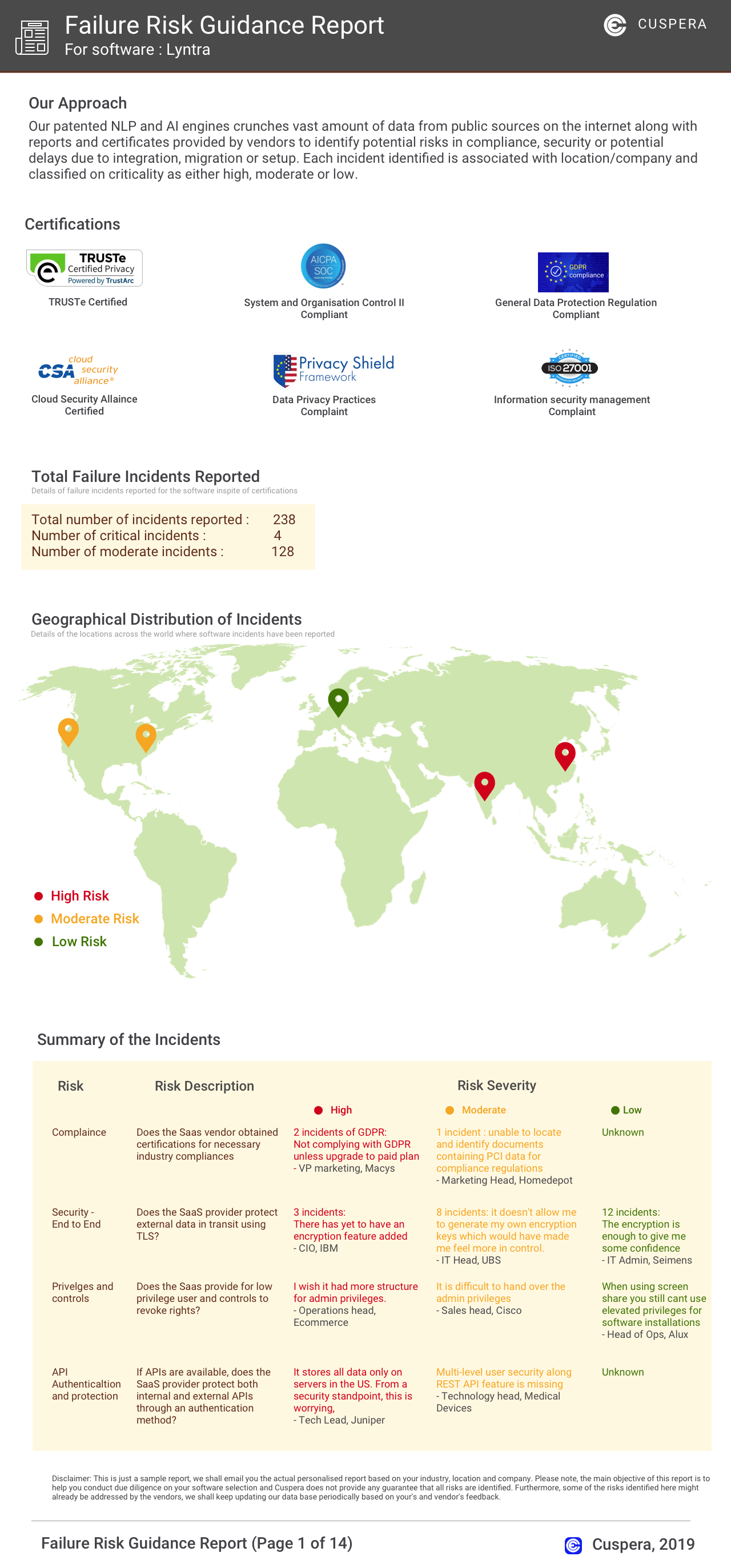
Software Failure Risk Guidance
?for Giva
Overall Risk Meter
Top Failure Risks for Giva
Giva, Inc. Profile
Company Name
Giva, Inc.
Company Website
https://www.givainc.com/HQ Location
1030 E. El Camino Real, Suite 200 Sunnyvale, CA 94087 USA
Employees
NA
Social

Financials
PRIVATE