Pipefy Overview
Pipefy brings structure, visibility, and organization to work processes. The platform allows users to take control and improve their workflows.
Use Cases
Customers recommend Workflow Management, Onboarding, Helpdesk Management, as the business use cases that they have been most satisfied with while using Pipefy.
Business Priorities
Launch New Products and Acquire Customers are the most popular business priorities that customers and associates have achieved using Pipefy.
Pipefy Use-Cases and Business Priorities: Customer Satisfaction Data
Pipefy's features include Templates, Personalization, Live Monitoring, etc. and Pipefy support capabilities include 24/7 Support, Email Support, AI Powered, etc. also Pipefy analytics capabilities include Analytics, and Custom Reports.
Reviews
"...We can monitor tasks and track productivity of staff (& ourselves)...." Peer review by Bernard G., Director
Peer review evidence (same sources as the product rating summary)
"...Ease and practicality when creating and/or tracking workflows...." Peer review by Chafi A, Engineering Manager
"...Also better custumer onboarding...." Peer review by Érico K., lawyer, Legal Services
"...It also has a helpdesk with which you can keep track of incidents, and be able to create tickets in each of the requirements of our customers, and what is more interesting is that all these tools are worked under the same platform so it is not necessary to be changing application...." Peer review by sorely m, graphic designer
Pipefy, Lokalise, Yespo Оmnichannel CDP, ExpertSender, Lead Liaison, etc., all belong to a category of solutions that help Marketing Automation. Each of them excels in different abilities. Therefore, determining the best platform for your business will depend on your specific needs and requirements.
Popular Business Setting
for Pipefy
Top Industries
- Information Technology and Services
- Computer Software
- Hospital & Health Care
Popular in
- Small Business
- Mid Market
- Large Enterprise
Pipefy is popular in Information Technology And Services, Computer Software, and Hospital & Health Care and is widely used by Small Business, Mid Market, and Large Enterprise.
Pipefy Customer wins, Customer success stories, Case studies
How can Pipefy optimize your Workflow Management Workflow?
Why is Pipefy the best choice for Onboarding?
How efficiently Does Pipefy manage your Helpdesk Management?
How can Pipefy enhance your Collaboration process?
How does Pipefy address your Communication Management Challenges?
Cloud AI Update - Pipefy Expands US Reach With Oracle Cloud AI Integration - simplywall.st
Frequently Asked Questions (FAQ)
What buyers ask before choosing Pipefy
Integrations What CRM integrations are available for Pipefy?
Pipefy offers a variety of CRM integrations to enhance its functionality and streamline business processes. Notable integrations include Salesforce, which allows users to manage customer relationships effectively, and HubSpot, enabling seamless marketing and sales alignment. Additionally, Pipefy integrates with other CRMs such as 1CRM, SugarCRM, and SuiteCRM, providing flexibility for businesses using different systems. Other integrations include tools like Outreach and SalesLoft for sales automation, as well as Pardot for marketing automation. These integrations facilitate automated workflows, improve data flow, and enhance overall efficiency, making Pipefy a versatile choice for businesses looking to optimize their CRM capabilities.
Integrations How does Pipefy connect with Salesforce and HubSpot?
Pipefy connects with Salesforce and HubSpot through native integrations that streamline data flow and enhance workflow automation. By integrating with Salesforce, Pipefy allows users to synchronize customer data, manage leads, and automate sales processes, ensuring that teams have access to real-time information for better decision-making. Similarly, the HubSpot integration enables users to automate marketing tasks, manage contacts, and track customer interactions seamlessly within Pipefy's platform. This connectivity not only improves efficiency by reducing manual data entry but also enhances collaboration across departments, allowing sales and marketing teams to work together more effectively. Overall, these integrations empower businesses to leverage their existing tools while maximizing the capabilities of Pipefy for process management and automation.
Integrations What are the setup steps for integrating Pipefy with Marketo?
To integrate Pipefy with Marketo, start by logging into your Pipefy account and navigating to the "Integrations" section. From there, locate Marketo in the list of available integrations and select it. You will need to authenticate your Marketo account by providing your Marketo credentials, allowing Pipefy to access your Marketo data. Once authenticated, you can configure the integration settings, such as selecting which Pipefy processes you want to connect with Marketo campaigns. After setting up the desired triggers and actions, save your configuration. Finally, test the integration to ensure that data flows correctly between Pipefy and Marketo, allowing for seamless automation of your marketing workflows. This integration enhances your marketing efforts by automating lead management and improving data accuracy across platforms.
Integrations Can I access the Pipefy API for custom integrations?
Yes, you can access the Pipefy API for custom integrations, which allows you to connect Pipefy with various external applications and services. The API provides flexibility for developers to automate processes, manage data, and enhance workflows tailored to your specific business needs. By utilizing the Pipefy API, you can integrate with popular platforms such as Salesforce, HubSpot, and various other tools, enabling seamless data exchange and process automation. This capability is particularly valuable for organizations looking to streamline operations and improve efficiency by creating custom solutions that fit their unique requirements. For detailed documentation and guidance on how to implement these integrations, you can visit the Pipefy API documentation on their website.
Integrations What is the data flow between Pipefy and other systems like SugarCRM?
The data flow between Pipefy and other systems like SugarCRM is facilitated through native integrations and APIs, allowing seamless communication and data exchange. When integrated, Pipefy can automate the transfer of information such as customer details, sales data, and task updates between the two platforms. For instance, when a new lead is created in SugarCRM, it can automatically trigger a workflow in Pipefy, ensuring that relevant teams are notified and tasks are assigned without manual input. This integration enhances operational efficiency by reducing data silos, improving information flow, and enabling real-time updates across systems. By leveraging these integrations, businesses can streamline their processes, enhance collaboration, and ultimately drive better decision-making based on accurate and timely data.
Integrations Are there any limitations to the integrations available with Pipefy?
While Pipefy offers a variety of integrations with popular platforms such as Salesforce, HubSpot, and Trello, there are some limitations to consider. Users may find that certain integrations require additional setup or customization to fully leverage their capabilities, which can be a barrier for those seeking a more straightforward solution. Additionally, while Pipefy supports native integrations with robust software, the depth and functionality of these integrations can vary, potentially limiting the seamlessness of data transfer and automation. Some users have also reported challenges with dashboard integration and the overall ease of use of these connections. Therefore, while Pipefy provides valuable integration options, businesses should assess their specific needs and the complexity of the integrations to ensure they align with their operational goals.
Features What does Pipefy's workflow automation feature do?
Pipefy's workflow automation feature streamlines and optimizes business processes by allowing users to create, manage, and automate workflows without extensive coding knowledge. This feature enables organizations to design custom workflows tailored to their specific needs, facilitating tasks such as document management, HR processes, and project management. By automating repetitive tasks, Pipefy enhances efficiency, reduces human error, and ensures consistency across operations. Users can set up triggers and notifications to keep teams informed and engaged, ultimately improving collaboration and productivity. The business value lies in the ability to centralize processes, track progress in real-time, and fulfill requests more quickly, as demonstrated by companies like Sofisa Bank, which significantly improved service delivery and request handling through Pipefy's automation capabilities.
Features How do I create a new workflow in Pipefy?
To create a new workflow in Pipefy, start by logging into your Pipefy account and navigating to the dashboard. Click on the "Create" button, usually located at the top right corner, and select "New Workflow" from the dropdown menu. You will then be prompted to choose a template or start from scratch. If you opt for a template, browse through the available options that suit your business needs, such as project management or document approval workflows. Once you select a template, customize it by adding phases, tasks, and assigning team members. You can also set up automation rules to streamline processes. Finally, save your workflow and share it with your team to begin using it effectively.
Features What functionalities does the document management workflow system in Pipefy offer?
The document management workflow system in Pipefy offers a comprehensive suite of functionalities designed to streamline document handling and enhance workflow efficiency. Key features include automated document routing, version control, and customizable templates, which allow users to create and manage documents tailored to their specific needs. Additionally, Pipefy supports integration with various platforms, enabling seamless data transfer and collaboration across tools. Users can also set up mandatory fields to ensure compliance and maintain data integrity throughout the workflow. The system is particularly beneficial for businesses looking to automate processes such as contract management and compliance workflows, ultimately reducing manual effort and increasing productivity. By leveraging these functionalities, organizations can achieve better control over their document processes and improve overall operational efficiency.
Features How can I automate my business processes using Pipefy?
To automate your business processes using Pipefy, start by identifying the specific workflows you want to streamline. Begin by mapping out your current processes to understand the steps involved and where automation can add value. Next, utilize Pipefy's no-code platform to create automated workflows by selecting templates or building custom processes tailored to your needs. You can set up triggers, notifications, and approvals to ensure smooth operations. Additionally, integrate Pipefy with other tools you use, such as ERP systems or CRM platforms, to centralize data and enhance efficiency. Finally, monitor the performance of your automated workflows through Pipefy's reporting features to continuously optimize and improve your processes. This approach will help reduce manual work, cut delivery times, and ultimately enhance your business's productivity.
Features What is the process for configuring automated leave management in Pipefy?
Configuring automated leave management in Pipefy involves several actionable steps to streamline the process. First, create a new workflow specifically for leave requests by selecting the "Create New Process" option in Pipefy. Next, define the stages of the leave request process, such as submission, approval, and notification. Utilize Pipefy's no-code automation features to set up automated notifications for both employees and managers at each stage. You can also incorporate mandatory fields to ensure all necessary information is collected during the request submission. Additionally, integrate Pipefy with other tools like HR management systems to centralize data and improve tracking. Finally, test the workflow to ensure it operates smoothly before rolling it out to your team, enhancing efficiency and employee experience in managing leave requests.
Features How do I use Pipefy's forms and workflow feature effectively?
To use Pipefy's forms and workflow feature effectively, start by defining the specific processes you want to automate, such as onboarding or customer support. Create custom forms tailored to gather the necessary information from users, ensuring that mandatory fields are included for critical data collection. Utilize Pipefy's workflow automation capabilities to set up triggers and actions that streamline the process, such as sending automatic emails or notifications when a form is submitted. Collaborate with your team by assigning tasks within the workflow, allowing for real-time updates and communication. Regularly review and optimize your workflows based on feedback and performance metrics to enhance efficiency and user experience. By leveraging these features, you can significantly improve task management and operational efficiency within your organization.
ROI & pricing What measurable business value can Pipefy provide for my organization?
Pipefy delivers significant measurable business value by automating workflows and enhancing operational efficiency across various departments. For instance, organizations like Viveo have automated 93% of customer interactions, resulting in faster response times and improved customer satisfaction, as evidenced by an 11-point increase in post-service Net Promoter Score (NPS). Similarly, Globalfy managed to deliver 172,000 services without increasing IT dependence, freeing up resources and reducing delays. Companies like SFIEC achieved a remarkable 151% ROI from time saved through automation, while CTA Smart saw a 300% sales growth within 18 months after streamlining their processes with Pipefy. By centralizing information and standardizing workflows, Pipefy empowers teams to focus on strategic activities, ultimately driving productivity and profitability for your organization.
ROI & pricing How does Pipefy help in achieving a positive ROI through automation?
Pipefy helps organizations achieve a positive ROI through automation by streamlining processes, reducing manual work, and enhancing operational efficiency. For instance, SFIEC automated 70 internal processes within three months, resulting in a remarkable 151% ROI from time saved. By enabling teams to automate repetitive tasks, Pipefy allows employees to focus on strategic activities rather than mundane operations. Additionally, companies like Viveo and Sofisa Bank have experienced significant improvements in customer interactions and service delivery, leading to increased customer satisfaction and retention. The platform's no-code automation empowers business analysts to create customized workflows, further driving efficiency and reducing costs. Overall, Pipefy's automation capabilities not only save time but also enhance productivity, ultimately contributing to a substantial return on investment for businesses.
ROI & pricing What are the different pricing plans available for Pipefy, and what do they include?
Pipefy offers several pricing plans tailored to different business needs, including a free tier for basic usage, which is ideal for small teams or individuals looking to explore the platform. The paid plans typically include features such as advanced workflow automation, enhanced collaboration tools, and integrations with other software like Salesforce and HubSpot. The pricing structure generally scales with the number of users and the level of features required, making it suitable for both small businesses and larger enterprises. For enterprise-level solutions, Pipefy provides customized pricing that includes additional support and compliance features. To get the most accurate and up-to-date pricing details, it's recommended to visit Pipefy's official website or contact their sales team directly.
ROI & pricing What is the total cost of ownership when using Pipefy for business process management?
The total cost of ownership (TCO) when using Pipefy for business process management includes several factors beyond just the subscription fees. While specific pricing details for Pipefy can vary based on the chosen plan and the number of users, businesses should also consider costs related to implementation, training, and ongoing support. Additionally, organizations may incur expenses for integrating Pipefy with other tools and platforms, such as Salesforce or HubSpot, which can enhance its functionality. It's essential to evaluate the potential ROI from improved efficiency and reduced manual work, as demonstrated by companies like SFIEC, which achieved a 151% ROI after automating processes with Pipefy. By assessing both direct and indirect costs, businesses can better understand the overall investment required for effective process management with Pipefy.
ROI & pricing How quickly can I expect to see value from implementing Pipefy in my business?
When implementing Pipefy, businesses can expect to see significant value relatively quickly, often within a few months. For instance, SFIEC automated 70 internal processes in just three months, achieving a 151% ROI from time saved through automation. Similarly, CTA Smart experienced a 53% reduction in their sales cycle, dropping from 90 to 42 days, and saw a remarkable 300% growth in sales within 18 months of using Pipefy. The platform's no-code automation capabilities empower teams to streamline workflows and reduce manual tasks, leading to faster process efficiencies and improved service delivery. Overall, the speed at which you realize value from Pipefy will depend on your specific use case and the complexity of your workflows, but many organizations report rapid improvements shortly after implementation.
ROI & pricing What cost savings can Pipefy deliver by reducing manual processes?
Pipefy can deliver significant cost savings by automating manual processes, which reduces the time and resources spent on repetitive tasks. For instance, organizations like SFIEC achieved a 151% ROI from time saved through automation, allowing teams to focus on strategic activities rather than manual work. By transitioning from inefficient methods such as email and spreadsheets to standardized workflows, companies like Coplacana experienced improved accuracy and reduced costs across their operations. Additionally, Pipefy's automation capabilities enable businesses to manage multiple processes with less IT dependence, as seen with Globalfy, which streamlined over 80 processes without increasing IT workload. Overall, Pipefy's no-code platform enhances operational efficiency, leading to lower labor costs and improved resource allocation, ultimately driving substantial financial benefits for businesses.
Capabilities What can Pipefy do for sales pipeline management?
Pipefy is an effective tool for sales pipeline management, offering features that streamline and automate various sales processes. It allows for customization of workflows, enabling teams to tailor the sales pipeline to their specific needs. With automated emails and notifications, Pipefy ensures timely communication with leads and clients, enhancing engagement. The platform also provides robust templates for organizing sales processes, making it easier to track progress and manage tasks. Additionally, Pipefy's integration capabilities with other software enhance data flow and reporting, allowing for better analytics and insights into sales performance. By simplifying the sales cycle, Pipefy can significantly reduce the time it takes to close deals, as evidenced by case studies where companies experienced a 53% improvement in their sales cycle duration.
Capabilities Does Pipefy support automated accounts payable workflows?
Yes, Pipefy supports automated accounts payable workflows, making it an effective solution for businesses looking to streamline their financial processes. With Pipefy, organizations can automate various tasks within the accounts payable cycle, such as invoice approvals and payment processing, which reduces manual intervention and minimizes errors. The platform allows users to create standardized workflows that ensure compliance and improve tracking of financial documents. By automating notifications and centralizing information, Pipefy enhances visibility and control over accounts payable operations. This not only speeds up the payment process but also helps in maintaining accurate financial records, ultimately contributing to better cash flow management and operational efficiency.
Capabilities Can Pipefy help with enterprise task management?
Yes, Pipefy can significantly aid in enterprise task management by providing a robust platform designed to streamline workflows and enhance collaboration across teams. Its features include customizable workflows, automation capabilities, and integration with tools like Salesforce, which allows for seamless data management and communication. Enterprises can benefit from Pipefy's ability to create structured processes that improve task visibility and accountability, ensuring that projects are completed efficiently. Additionally, its user-friendly interface and flexibility make it suitable for various departments, from HR to project management, enabling organizations to adapt the platform to their specific needs. Overall, Pipefy empowers enterprises to optimize their task management processes, leading to increased productivity and better resource allocation.
Capabilities What compliance features does Pipefy offer for enterprise readiness?
Pipefy offers a range of compliance features designed to enhance enterprise readiness, ensuring that businesses can meet regulatory requirements and maintain operational integrity. These features include robust data management capabilities, which allow organizations to handle firmographic and technographic data securely, as well as buyer intent signals that help in assessing compliance with industry standards. Additionally, Pipefy's automation tools facilitate the creation of workflows that incorporate mandatory fields and automatic notifications, ensuring that all necessary compliance steps are followed. The platform's integration with CRM systems further supports compliance by centralizing customer data and interactions, making it easier for enterprises to maintain accurate records and adhere to regulations. Overall, these compliance features empower businesses to streamline their processes while ensuring they remain compliant with relevant laws and standards.
Capabilities Does Pipefy provide capabilities for customer journey mapping?
Pipefy does not specifically offer dedicated customer journey mapping capabilities as a standalone feature; however, it provides robust workflow automation and process management tools that can facilitate aspects of customer journey mapping. By utilizing Pipefy's automated workflows, businesses can streamline customer interactions and track various touchpoints throughout the customer lifecycle. This can help organizations visualize and optimize their customer journeys indirectly by standardizing processes and improving communication across departments. Additionally, Pipefy's integration capabilities allow for connections with other software tools that may specialize in customer journey mapping, enhancing the overall customer experience. Therefore, while Pipefy may not be a direct solution for customer journey mapping, it can support related processes effectively.
Capabilities Can Pipefy manage financial workflow processes effectively?
Yes, Pipefy can effectively manage financial workflow processes by providing a flexible platform that automates and streamlines various financial tasks. With its no-code automation capabilities, businesses can create customized workflows tailored to their specific financial operations, such as invoice approvals, budgeting, and expense tracking. Pipefy's integration with external programs through APIs allows for seamless connections to existing financial systems, enhancing data accuracy and reducing manual errors. Additionally, companies like Globalfy have successfully utilized Pipefy to manage over 80 processes across departments, demonstrating its ability to reduce IT dependence and improve operational efficiency. By standardizing workflows and automating repetitive tasks, Pipefy helps finance teams focus on strategic activities, ultimately leading to better financial management and decision-making.
Use cases How can SDRs use Pipefy to streamline their lead management process?
Sales Development Representatives (SDRs) can use Pipefy to streamline their lead management process by automating and centralizing various tasks associated with lead tracking and follow-up. By utilizing Pipefy's customizable workflows, SDRs can create specific pipelines for different lead stages, ensuring that no lead is overlooked. The platform allows for automated notifications and email communications, which helps SDRs stay on top of follow-ups and manage their time effectively. Additionally, Pipefy's integration capabilities with other tools, such as CRM systems, enable seamless data flow and improved collaboration among team members. This results in faster response times and a more organized approach to lead management, ultimately enhancing the SDRs' efficiency and effectiveness in converting leads into customers.
Use cases What are the best use cases for Pipefy in marketing teams looking to automate workflows?
Pipefy is an excellent choice for marketing teams looking to automate workflows, particularly in areas such as campaign management, lead tracking, and content approval processes. By centralizing requests and automating repetitive tasks, marketing teams can significantly reduce time spent on manual processes, as demonstrated by IMImobile South Africa, which reported an 80% reduction in time managing marketing requests. Pipefy's automated workflows ensure that all requests are executed accurately, improving overall efficiency and reporting speed. Additionally, its integration capabilities with other software platforms enhance collaboration across departments, allowing marketing teams to streamline their operations and focus on strategic initiatives rather than administrative tasks. This makes Pipefy a valuable tool for any marketing team aiming to enhance productivity and effectiveness.
Use cases In what scenarios should RevOps teams implement Pipefy for process optimization?
RevOps teams should consider implementing Pipefy for process optimization in scenarios where they face inefficiencies due to manual workflows, disconnected systems, or a lack of real-time visibility into operations. For instance, if teams are struggling with onboarding, customer support, or managing multiple HR processes, Pipefy can streamline these tasks through automation and standardized workflows. Additionally, organizations experiencing rapid growth or digital transformation, like Globalfy and CNH Industrial, can benefit from Pipefy's ability to reduce IT bottlenecks and enhance cross-departmental collaboration. By utilizing Pipefy, RevOps teams can improve efficiency, reduce costs, and gain better insights through automated reporting, ultimately leading to a more agile and responsive operational framework.
Use cases How can sales leaders leverage Pipefy to improve their sales pipeline management?
Sales leaders can leverage Pipefy to enhance their sales pipeline management by utilizing its customizable workflows and automation features. By setting up tailored processes, teams can streamline their sales activities, ensuring that every stage of the pipeline is efficiently managed. Pipefy allows for automated email notifications and task assignments, which helps in maintaining communication and accountability among team members. Additionally, its robust reporting and analytics capabilities provide valuable insights into sales performance, enabling leaders to make data-driven decisions. With the ability to integrate with other tools, such as CRM systems, Pipefy centralizes information flow, reduces manual tasks, and ultimately shortens the sales cycle, as evidenced by companies like CTA Smart, which saw a 53% improvement in their sales cycle after implementing Pipefy.
Use cases What workflows can be automated in HR using Pipefy for onboarding new employees?
Pipefy offers a robust platform for automating various HR workflows related to onboarding new employees. Key processes that can be automated include document management, where necessary paperwork is generated and tracked digitally, and onboarding tasks such as scheduling orientation sessions and assigning training modules. Additionally, Pipefy's AI agents can streamline resume screening and candidate ranking, ensuring that the best candidates are prioritized. The platform also facilitates automated notifications and reminders for both HR teams and new hires, enhancing communication and engagement throughout the onboarding process. By digitizing these workflows, HR departments can significantly reduce manual work, improve efficiency, and create a more positive employee experience, ultimately leading to faster integration of new hires into the organization.
Use cases When is it most beneficial for creative agencies to adopt Pipefy for project management?
Creative agencies can benefit from adopting Pipefy for project management when they require a flexible and customizable platform to manage diverse projects and workflows. Pipefy's productivity and collaboration tools enable teams to streamline processes, automate repetitive tasks, and maintain clear communication, which is essential in a creative environment where projects often involve multiple stakeholders and evolving requirements. Additionally, agencies can leverage Pipefy's capabilities for task management, document collaboration, and integration with other tools, enhancing overall efficiency. The platform is particularly advantageous when agencies need to manage complex projects that demand a high level of customization and control, making it an ideal choice for creative teams looking to optimize their project management practices.
Alternatives What are the best alternatives to Pipefy?
When considering alternatives to Pipefy, two notable options are Kissflow and Quickbase. Kissflow offers a user-friendly interface and is particularly strong in workflow automation, making it suitable for businesses looking to streamline processes without extensive technical knowledge. Quickbase, on the other hand, is known for its robust customization capabilities and is ideal for organizations that require a high degree of flexibility in their project management and process automation. Both platforms provide unique features that cater to different business needs, such as Kissflow's focus on simplicity and Quickbase's emphasis on complex data handling. Evaluating these alternatives can help businesses find the right fit based on their specific requirements for workflow management and automation.
Alternatives How does Pipefy compare to Quickbase?
Pipefy and Quickbase are both powerful process management tools, but they cater to different needs and user preferences. Pipefy excels in workflow automation and is particularly suited for teams looking to streamline processes with customizable templates and automated emails, making it ideal for ticket management and internal processes. In contrast, Quickbase offers a more robust platform for building custom applications and managing complex data, which may be better for organizations needing extensive reporting and analytics capabilities. While Pipefy is user-friendly and great for smaller teams or specific tasks, Quickbase may appeal to larger enterprises requiring deeper integrations and data management. Ultimately, the choice between Pipefy and Quickbase depends on your specific business requirements and the complexity of the processes you need to manage.
Alternatives What are the key differences between Pipefy and Kissflow?
Pipefy and Kissflow are both workflow automation platforms, but they cater to different business needs and user experiences. Pipefy excels in process management with its customizable workflows, automated emails, and strong integration capabilities, making it ideal for teams that require detailed control over their processes. It is particularly suited for ticket management and complex workflows. In contrast, Kissflow focuses on simplicity and ease of use, offering a more straightforward interface for users who may not need extensive customization. While Kissflow provides good reporting and analytics, it may lack some of the advanced automation features found in Pipefy. Ultimately, the choice between the two depends on whether a business prioritizes customization and complexity (Pipefy) or ease of use and simplicity (Kissflow).
Alternatives Why should I choose Pipefy over its competitors?
Choosing Pipefy over its competitors, such as Quickbase, comes down to its robust workflow automation capabilities and user-friendly interface, which make it accessible for teams of all technical levels. Pipefy excels in process management, allowing for extensive customization and integration with various software tools, enhancing operational efficiency. It offers features like automated emails, mandatory fields, and seamless connections to external programs through APIs, which can significantly streamline workflows. Additionally, Pipefy has proven success in diverse industries, as seen in case studies where companies like Viveo and GPA House achieved remarkable improvements in customer interactions and operational scaling. While some competitors may offer better reporting or analytics, Pipefy's focus on automation and ease of use makes it an ideal choice for businesses looking to enhance their process management without a steep learning curve.
Alternatives What makes Quickbase a better option than Pipefy?
Quickbase may be considered a better option than Pipefy for businesses that prioritize robust reporting and analytics capabilities, as Quickbase offers more advanced features in this area. Additionally, Quickbase is known for its flexibility in creating custom applications tailored to specific business needs, which can be advantageous for organizations requiring unique solutions. Users have noted that Quickbase provides a more intuitive mobile experience, making it easier to manage tasks on the go. However, while Pipefy excels in workflow automation and process management with its user-friendly interface, Quickbase's strengths lie in its comprehensive data management and application development capabilities, making it a strong contender for companies focused on data-driven decision-making and custom app creation.
Alternatives How does Pipefy stack up against other workflow management tools?
Pipefy stands out among workflow management tools due to its robust automation capabilities and user-friendly interface, making it ideal for businesses seeking to streamline processes. Compared to competitors like Quickbase, which offers extensive customization but can be more complex, Pipefy provides a more intuitive setup that appeals to users looking for efficiency without a steep learning curve. Additionally, Pipefy's native integrations with various platforms enhance its functionality, allowing seamless connections with tools like Salesforce and HubSpot. While Quickbase may excel in handling complex data management tasks, Pipefy is particularly effective for teams focused on automating workflows and improving task management efficiency. Ultimately, the choice between Pipefy and other tools depends on specific business needs, such as the level of customization required versus ease of use.
Pipefy Competitors


Pipefy Features
- Low
- Medium
- High
| FEATURE | RATINGS AND REVIEWS |
|---|---|
| AI Powered | Read Reviews (1) |
| Analytics | Read Reviews (40) |
| Custom Reports | Read Reviews (209) |
| CAPABILITIES | RATINGS AND REVIEWS |
|---|---|
| AI Powered | Read Reviews (1) |
| Analytics | Read Reviews (40) |
| Custom Reports | Read Reviews (209) |
Pipefy Integrations
Pipefy integrates with a wide range of software applications through its robust data import and export capabilities.


Few API Integrations for Pipefy


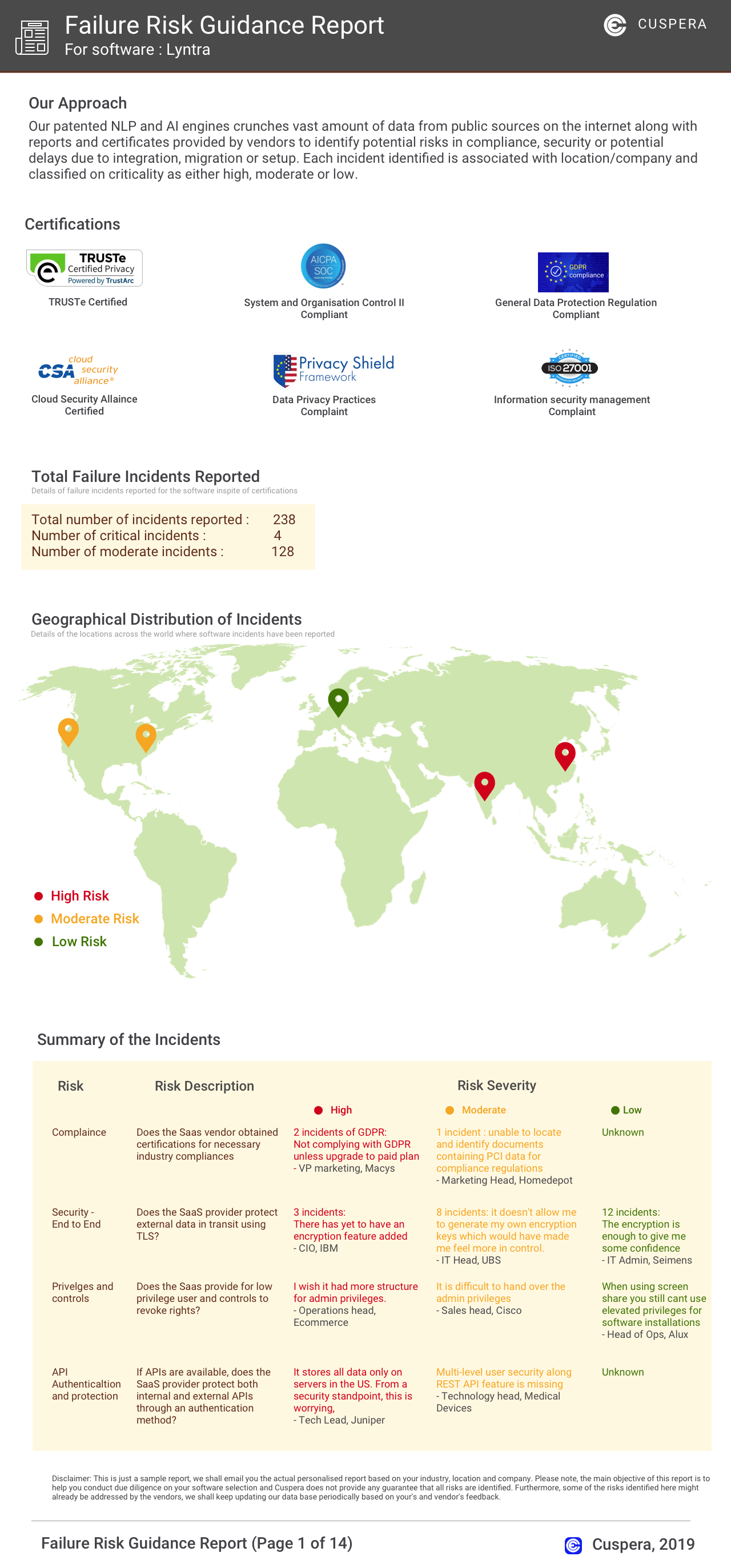
Software Failure Risk Guidance
?for Pipefy
Overall Risk Meter
Top Failure Risks for Pipefy
Pipefy Inc. News
Pipefy Named to 2026 Inc. 5000 List of America’s Fastest-Growing Private Companies
Pipefy has been named to the 2026 Inc. 5000 list of America's fastest-growing private companies for the third consecutive year, highlighting its significant growth and impact in AI-driven business process orchestration.
Pipefy Named One of the Market Shapers in Gartner® Emerging Market Quadrant for No-Code Agent Builders - Startup Vendors
Pipefy has been recognized as a Market Shaper in the 2026 Gartner Emerging Market Quadrant for No-Code Agent Builders - Startup Vendors. This acknowledgment highlights Pipefy's role in AI-driven business process orchestration, enabling enterprises to automate processes with AI while maintaining IT oversight and compliance.
Pipefy Named One of the Market Shapers in Gartner® Emerging Market Quadrant for No-Code Agent Builders - Startup Vendors | Markets Insider
Pipefy has been recognized as one of the Market Shapers in the 2026 Gartner Emerging Market Quadrant for No-Code Agent Builders. This recognition highlights Pipefy's role in enabling AI-driven business process orchestration without coding, empowering business experts to create agentic automations while maintaining IT oversight.
Pipefy Expands Global Partnerships and Strategic Alliances Executive ...
Pipefy announced the appointment of Sandro Guedes as Global Director of Partnerships and Adriano Galvão as VP of Global Strategic Alliances. This move aims to enhance Pipefy's partner-led growth strategy, particularly in Brazil and North America, by leveraging the executives' experience with major cloud and AI companies like Oracle, Google, Microsoft, and AWS.
Pipefy Inc. Profile
Company Name
Pipefy Inc.
Company Website
https://www.pipefy.com/HQ Location
San Francisco, California
Employees
101-250
Social


Financials
SERIES B